Supermarket AGV "User Interaction": How Important Is the Touchscreen Design of a Fanless Industrial PC?
This isn't fear-mongering.
The supermarket is the most "anti-AGV" environment of all retail scenarios. Dense crowds, slippery floors, products in every conceivable shape, promotional displays that change on a dime. You confidently deployed ten AGVs, and in the very first month, you had three incidents — not the AGV hitting people, but people not knowing how to use the AGV.
The stocker stands in front of the screen and doesn't know which icon to tap. Customers block the aisle and the AGV just sits there waiting. A promoter moves a shelf on the fly but forgets to update the system, so the AGV keeps running to the old location…
You start to wonder: is AGV just not suited for supermarkets?
No. You overlooked the most basic — yet most fatal — link: human-machine interaction.
No matter how smart an AGV is, someone has to "tell" it what to do. And that "telling" interface is the touchscreen on the fanless industrial PC. It's not a decoration. It's not an accessory. It's the only window in the entire chain where humans and machines talk directly. How well that window is designed directly determines whether your 2 million was wasted or actually generated returns.
Today, I'm not going to talk about how amazing AGVs are. I'm just going to talk about one thing: how a touchscreen turns your supermarket AGV from a "display piece" into a "money printer."
8 AM. Peak restocking time. Stocker Xiao Wang stands in front of the AGV's touchscreen, his hands still wet — just finished hauling yogurt out of the cold storage. He wants the AGV to move the milk from Zone B to the display stack near the checkout. But the icons on the screen are too small, the buttons too dense, and he's wearing food-grade gloves so he can't tap accurately. He taps three times. No response. The AGV doesn't budge.
Five people are lined up behind him, and every one of them is cursing.
This isn't Xiao Wang's problem. It's the screen's problem.
Traditional fanless industrial PC touchscreens use resistive screens — low precision, no multi-touch support, basically useless with gloves on. In a supermarket with high-frequency operations and a complex environment, a resistive screen is a disaster.
What's the solution now? Projected capacitive touchscreen. The same technology as the screen on your phone. Supports wet hands, supports gloves, supports multi-touch. Icon-based interface design slashes new employee training from 15 days down to 3 days. Real-world data from a touch all-in-one solution: warehouse staff task response speed up 60%, system switch error rate approaching zero.
Think about it: how high is supermarket employee turnover? Three batches a month is normal. If every new person needs half a month of training, your AGV won't even get off the ground before your people are all gone.
A good touchscreen doesn't just make operation simpler. It makes "anyone can operate it."
2 PM. A promoter temporarily moves laundry detergent from Shelf A to Shelf B but forgets to update the system. The AGV still runs to Shelf A following the old path, finds nothing there, spins in circles, and blocks the entire aisle.
Customers walk around it. A stocker comes over to manually move the AGV. A five-minute job turns into fifteen minutes of chaos.
Where's the problem? The interaction isn't "proactive" enough.
Traditional touchscreens are "passive execution" — you tap, it does; you don't tap, it waits stupidly. But the supermarket is dynamic, changing every second. What you need isn't an "obedient screen." You need a "thinking screen."
What do leading solutions do now? Touch terminal + AI algorithm = smart advisor. After the operator issues a command on the touch interface, the system automatically verifies shelf electronic tag information and generates visual reports. Some high-end models even integrate voice assistance — you don't need to tap the screen. Just say "dispatch AGV to Shelf 3," and the system executes. With both hands free, picking efficiency goes up another 15%.
Even more powerful is predictive interaction: the system automatically generates restocking suggestions and capacity allocation plans based on historical data. An international fast-fashion brand used this feature to cut new product launch decision time by 60% and improve slow-moving inventory handling efficiency by 45%.
From "you tell it what to do" to "it tells you what to do" — that's what a touchscreen should look like in a supermarket.
9 PM. Before closing. The AGV suddenly stops dead in the middle of the aisle. The store manager calls IT. IT says, "take a photo and send it over." The manager takes a photo. IT looks at it for a while and says, "it might be the communication module. Wait for the engineer tomorrow."
One AGV down. The entire restocking line paralyzed. Have you calculated that loss?
The average fault handling time for traditional solutions is 8 hours. Because the touchscreen can only display the word "abnormal" — what exactly is abnormal, how to fix it — everything relies on manual troubleshooting.
What does a modern fanless industrial PC touchscreen do? A device self-check interface displays the real-time status of the AGV, sorter, and other equipment. When an abnormality occurs, an alarm triggers automatically, and the operator can complete a one-tap repair report via touch operation. Average fault handling time drops from 8 hours to under 2 hours. Overall Equipment Effectiveness (OEE) is pushed straight to over 92%.
You see, the touchscreen isn't just an "operation panel." It's also a "diagnostic terminal." A good screen turns your operations from "firefighting" into "fire prevention."
Many people think: a touchscreen is a touchscreen. What works in a factory works in a supermarket.
Dead wrong.
Let me break the differences into four dimensions. You'll see immediately:
| Dimension | Factory Scenario | Supermarket Scenario | Touchscreen Requirements |
|---|---|---|---|
| Operating Environment | Controlled temp, dry floor | Cold storage -30°C to ambient, wet floors, heavy dust | Wide-temp design, IP65+ protection, wet-hand support |
| Operators | Professional technicians, long training | Part-time stockers, promoters, extremely high turnover | Icon-based UI, voice interaction, up to speed in 3 days |
| Task Characteristics | Fixed routes, repetitive tasks | Frequent promo changes, ad-hoc orders, human-machine mix | Real-time path updates, dynamic task reallocation, voice dispatching |
| Fault Tolerance | Line downtime is costly but planned | Down before closing = direct revenue loss | One-tap repair, self-diagnosis, respond within 2 hours |
You see, supermarkets demand far more from a touchscreen than factories do. It's not "good enough to work." It's "work in the worst environment, let the least trained people do the most varied tasks, and fix problems the fastest."
Miss any one of these four, and your AGV in a supermarket is just an "expensive display piece."
I know you're the one who runs the numbers. So let's talk numbers:
| Metric | Unoptimized Touchscreen (Traditional Resistive) | Optimized Touchscreen (Capacitive + AI Interaction) | Gap |
|---|---|---|---|
| New employee training cycle | 15 days | 3 days | Shortened by 80% |
| Task response speed | Baseline | Up 60% | 40% more tasks per day |
| Fault handling time | 8 hours | 2 hours | Shortened by 75% |
| Inventory accuracy | 85% | 98%+ | Stockout rate down 65% |
| Picking error rate | 3%-5% | <1% | Customer complaints down 80% |
| Operator error rate | High | Near zero | Zero system switch errors |
An e-commerce warehouse that introduced smart touch terminal solutions saw inventory turnover improve by 40%. A supermarket chain that adopted voice interaction + capacitive touchscreen saw employee picking efficiency up 15% and stockout rate down 65%.
The money you spend on the touchscreen might be only 2% of the entire AGV project. But it determines whether the other 98% actually delivers results.
It's like buying a Ferrari but putting a bicycle steering wheel on it — no matter how good the car is, you can't drive it fast.
Four hard requirements. All non-negotiable:
A resistive screen in a supermarket is garbage. Wet hands, gloves, multi-touch — these are the baseline, not bonuses.
Supermarkets have cold-storage zones and ambient zones. The temperature swing can exceed 40°C. If the touchscreen only supports 0-40°C, your cold-storage AGV will go to a black screen the moment winter hits. Wide-temperature design (-30°C to 70°C) is a must-have.
Not a nice-to-have. A must-have. When a stocker's hands are full, voice is the only way to interact.
The local touchscreen needs to display maps, status, battery level, fault information — and allow manual operation. It can't be "everything requires a backend connection to see."
These four requirements are the "blood-and-tears standards" I've distilled from watching countless supermarket AGV projects fail.
Your AGV might have cost hundreds of thousands or even millions. Your WMS system might have cost hundreds of thousands. Your shelves, sensors, navigation modules — every single one was carefully selected.
But in the end, that "conversation" between human and machine? You probably just threw in the cheapest resistive screen you could find.
And then you blame the AGV for not working.
It's not the AGV that doesn't work. You didn't give it a "face that can talk."
The supermarket is the most complex scenario in retail, period. Foot traffic, temperature, humidity, promotions, last-minute order changes… every second is different. For your AGV to survive in this environment, it doesn't just rely on algorithms and motors. It relies even more on that touchscreen that lets anyone understand it in three seconds and get up to speed in three minutes.
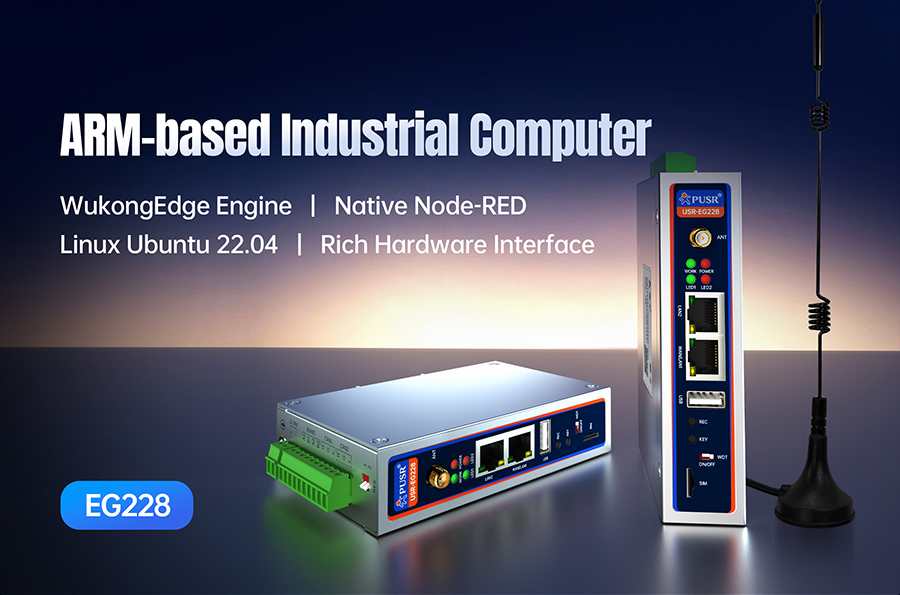
USR IoT's USR-EG228 was built exactly on this logic. Projected capacitive screen, wide-temperature design, voice interaction support, fanless fully sealed — ran for 30 consecutive days in a 60°C high-temperature environment with zero failures. An engineer at a Shenzhen new energy factory completed an entire production line upgrade in two weeks, saving 230,000 yuan in equipment procurement costs.
I'm not saying it's the only choice. But if you're picking that "face" for your supermarket AGV, it deserves to be in the top three on your comparison list.
Retail's last mile isn't about how fast the AGV runs. It's about how smooth that one "tap" between human and machine is.
And that touchscreen is the entirety of that one "tap."