From Single Machine to Cluster: How Does an Industrial Touch Screen Computer Support Swarm-Style Production Scheduling for 50+ Collaborative Robots?
Have you ever seen an unmanned factory at 4 AM?
Not the "factory of the future" from videos and promotional reels. The real thing — harsh white lighting, robotic arms moving in perfect unison, not a single human in sight.
Over 50 collaborative robots, like a swarm of precision bees — each doing its own job, never colliding, perfectly synchronized. Stare at them for three minutes and you'll get the eerie feeling: they seem to have a mind of their own.
But step back, and you'll see that unassuming corner — an industrial touch screen computer, sitting there quietly.
The brain of 50 robots isn't on the robots. It's on that machine.
Your project goes like this:
A client wants to deploy a collaborative robot production line. Not one robot. Not five. Fifty, minimum. Each robot handles one station — from loading, assembly, inspection, to unloading — fully unmanned.
What's your first reaction?
"Let's get the single machine working first. We'll figure out the cluster later."
I've seen this mindset in too many project managers. And then what happens?
Single machine tuned and working. Scale up to 10 units — problems start appearing. 15 units — problems amplify. 20 units — the scheduling system collapses. Robots start fighting over resources, waiting for signals, missing beats.
A single machine running perfectly is one logic. Put it into a cluster, and it's an entirely different logic.
There's a sentence in Nalarobot's selection guide that, applied to the cluster scheduling scenario, is practically a prophecy:
"Be mindful of over-specifying, which can lead to unnecessary costs. But not all features may be necessary for your specific application."
Flip that around: the feature you thought was "unnecessary" for a single machine, in a 50-unit cluster, might be the line between life and death.
Most people think the hard part of cluster scheduling is "keeping them from crashing into each other."
It's not.
Avoiding collisions is just the bare minimum. The real nightmare is when these five things happen at the same time:
| # | Challenge | Real Scenario |
|---|---|---|
| ① | Communication Storm | 50 robots each sending 100 status messages per second — 5,000 messages/second flooding in, and your industrial PC's network layer gets blown apart |
| ② | Rhythm Jitter | Robot #37 slows down by 0.3 seconds — the 12 robots behind it all wait for it, and the entire line stops |
| ③ | Heat Accumulation | Motion data from 50 robots + scheduling algorithms running simultaneously — CPU sustained above 90%, temperature skyrockets |
| ④ | Single Point of Failure | The scheduling host goes down — all 50 robots lose their "commander." They either stop or go haywire |
| ⑤ | Expansion Dead End | Client says "start with 50, add 80 later" — your system architecture can't handle it at all |
Eurocoin's article mentions:
"The performance, reliability, and long-term availability of your industrial PC systems directly impact uptime, maintenance costs, and overall system stability."
One machine's performance affects one station. One scheduling host's performance affects the life and death of the entire line.
This is why cluster scheduling selection and single-machine selection are completely different species.
On the surface, what you need is "a powerful industrial PC."
But when you actually run it, you'll find that raw performance is just the entry ticket. What truly decides success or failure is the stuff youcan't see on the spec sheet:
Requirement 1: The network isn't "good enough if it works" — it's "5,000 messages/second with zero packet loss"
Real-time communication for 50 robots doesn't run on ordinary Ethernet. You need hard real-time Ethernet or at least gigabit deterministic communication capability.
A standard industrial PC with one network port can handle 10 robots fine. 50? The network stack collapses.
Corvalent's article states clearly:
"Industrial PCs often come with advanced cooling systems to manage heat generated by the CPU and other components."
But what they don't say is — when network data and scheduling algorithms pour in simultaneously, the thermal pressure is 3 to 5 times that of a single machine. The fan spins, dust gets sucked in. Dust gets in, cooling efficiency drops. Cooling drops, CPU throttles. CPU throttles, scheduling latency spikes. Scheduling latency spikes, rhythm falls apart.
This is a death chain. And it starts with the wrong cooling solution.
The core algorithms of swarm scheduling — path planning, collision detection, dynamic reallocation — all run in memory.
The state matrix of 50 robots, trajectory data that changes over time, intermediate results of real-time optimization… 8GB of RAM gets eaten up the moment you open the scheduling software.
Nalarobot says:
"Aim for at least 8GB or more, depending on your specific needs."
In a cluster scenario, that "or more" should be understood as: 16GB is the floor, 32GB is where you can breathe easy.
50 robots means your industrial touch screen computer must connect to at least:
Every channel is competing for resources. If I/O channels are shared, a data burst from the vision system could delay Robot #3's status signal by 200 milliseconds.
200 milliseconds is nothing in a single-machine scenario. In a swarm of 50 robots, it's a chain-reaction pileup.
This is the most easily overlooked point.
A single machine breaks — you swap it out, the line stops for half an hour. The cluster's scheduling host breaks? All 50 robots lose synchronization. Best case: production stops. Worst case: equipment collision damage.
So what you need isn't just "reliable" — it's redundant design, watchdog mechanisms, and fast recovery after failure.
Eurocoin puts it plainly:
"Regular maintenance and future-proofing are essential parts of this process."
In a cluster scenario, this sentence should be in bold red — your scheduling hostmustbe the last thing to fall on the entire line.
Your production line is designed for 8 to 10 years of service. But what if the industrial touch screen computer you chose gets discontinued by the supplier in two years?
The thing a cluster scheduling system fears most isn't hardware failure — it's hardware discontinuation, spare parts cutoff, and software no longer being updated.
The scheduling logic for 50 robots is hardcoded into this host. Swap it out? The migration cost is ten times higher than you think.
In Nalarobot's article, Dr. Emily Hart said:
"The right Industrial PC can significantly enhance operational efficiency."
But in a cluster scenario, I want to add a line:
Pick the wrong one, and it can bring your entire line's efficiency to zero.
So don't start selecting from "performance." Start from "can it take the hit":
| Can It Take the Hit? | The Question You Should Ask Yourself |
|---|---|
| Can it handle the communication storm? | 50 robots at full communication load simultaneously — will the network layer collapse? |
| Can it handle heat accumulation? | 7×24 full-load operation — how long can fanless cooling hold up? |
| Can it handle memory pressure? | Scheduling algorithms + state matrix + logs — is the memory enough? |
| Can it handle I/O concurrency? | Vision, PLC, robots, safety loops all running at once — will they fight for resources? |
| Can it handle downtime? | After the host crashes, is recovery time in seconds or in minutes? |
| Can it handle time? | In 5 years, will this machine still be in the product line? |
If you can't answer any one of these six questions, don't sign off on it.
By now, you probably already have a "requirements checklist" in your head. But when you open the supplier's website, you'll find —
The performance is there, but the cooling is fan-based. Or it's fanless, but not enough I/O. Or the I/O is there, but max memory is only 16GB. Or everything checks out, but the form factor is too big to fit in the control cabinet.
A scheduling host for cluster operations is the most "demanding" application scenario in industrial PCs. Products that meet all conditions simultaneously are extremely rare.
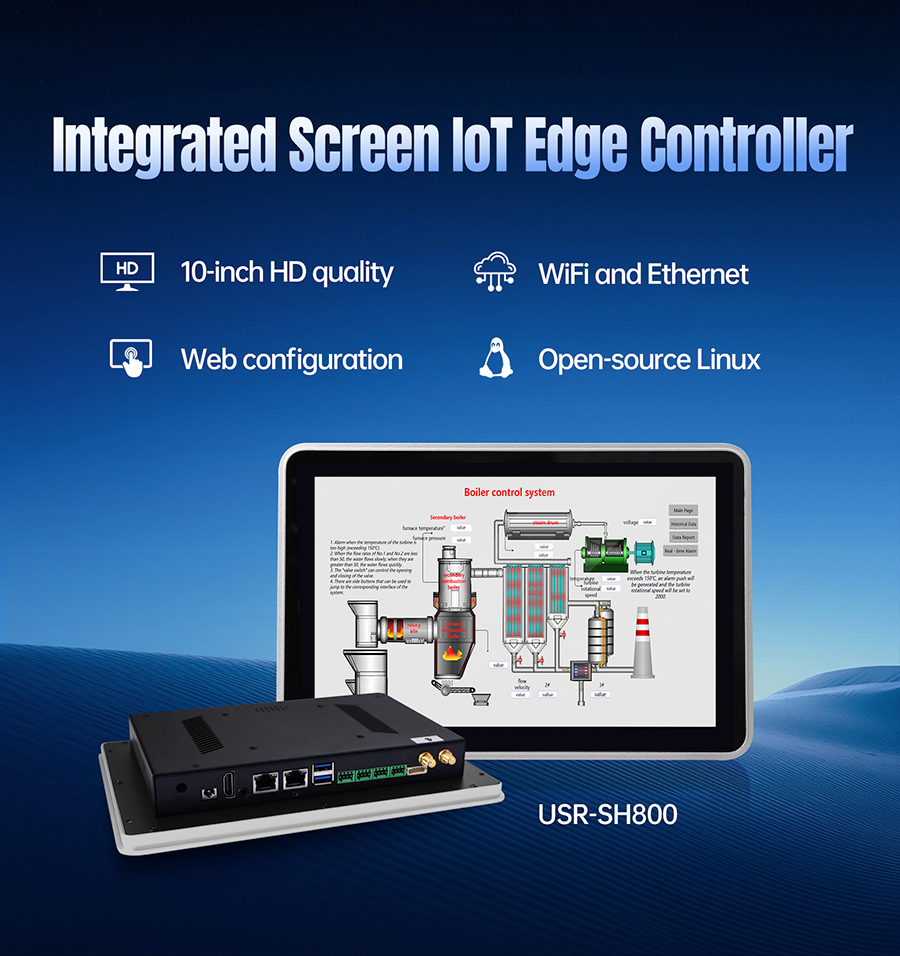
If you're comparing solutions, I recommend seriously putting theUSR-SH800on your evaluation list.
Not because it's "universal," but because its capability model happens to hit every core pain point of swarm scheduling:
| Swarm Scheduling Core Pain Point | USR-SH800's Corresponding Capability |
|---|---|
| 5,000 msg/sec communication, zero packet loss | Multi-network port design, strong network throughput, hard real-time scheduling |
| 7×24 full-load, no throttling | Fully passive fanless cooling, stable continuous operation in high-temp environments |
| Scheduling algorithms + state matrix eat memory | Large-capacity memory configuration, multi-task parallel without lag |
| 50+ I/O channels, independent, no contention | Rich I/O interfaces — robots, PLCs, vision each get dedicated channels |
| Host down, but line can't fully stop | Industrial-grade reliability design, supports watchdog + fast recovery |
| Still buyable in 5 years | Long lifecycle supply, industrial-grade component selection |
| Fits in the control cabinet | Integrated compact design, suitable for cluster control cabinet integration |
| Export projects need certifications | CE/FCC certified, full compliance, no barriers |
It's not "specially designed" for 50 robots. But it's one of the few choices on the market today that can simultaneously withstand the communication storm, heat accumulation, I/O concurrency, and long-cycle operation.
People who work on cluster scheduling projects carry the most pressure.
Because when a single machine fails, you can say "that's that machine's problem." When the cluster fails, everyone looks at you and says: "That's your host's problem."
So when you're selecting, you're not picking a machine. You're picking the commander of 50 robots, the anchor of the entire production line, and the confidence that lets you sleep soundly after project delivery.
Put the USR-SH800 on your comparison list. Use the "Six Can-It-Take-the-Hit?" table above to measure every candidate.
But please remember one thing:
A swarm is powerful not because every bee is amazing — it's because they have a queen that never falls.
Your industrial touch screen computer is that queen.
Pick right, and 50 robots are an army. Pick wrong, and they're 50 pieces of scrap fighting each other.