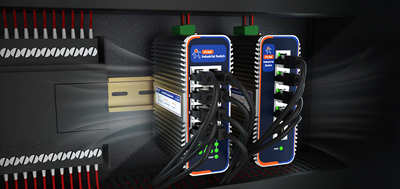
A packaging line has a dozen fanless industrial PC mounted in a PLC cabinet, drawing 24V, temperature and humidity within spec, yet almost every unit needs a system reinstall within a year. The first thing to go is connectivity.
Specs on paper do not translate to longevity in the field. What determines lifespan is where water, moisture, and cleaning chemicals enter the cabinet, and where they settle once inside.
A fanless design eliminates the single moving part that attracts dust and wears out bearings. Removing the fan is not the same as sealing the enclosure. Heat dissipation shifts to the metal chassis, which passes heat to cabinet walls or relies on top-to-bottom airflow — not stacked above a variable frequency drive.
The overlooked item is cleaning chemicals. Alkaline foam sprays or chlorine-based formulations can penetrate the cabinet during door-open maintenance. Steam exposure to an aluminum alloy chassis leads to long-term corrosion. Confirm housing material compatibility with the cleaners used on site during selection.
Reading temperature and humidity specs matters. The rated temperature refers to ambient air temperature around the unit, not surface temperature. Inside the cabinet, self-heating and heat from adjacent drives must be added. The three words "non-condensing" in the humidity column are what actually matter. Moving cold zones into warm zones, or cooling down after a rinse cycle, creates condensation — and condensation is not covered by any IP rating.
The all-aluminum fanless chassis itself functions as a heatsink. Heat conducts from the processor into the enclosure, and larger surface area means better dissipation. Compact machines have limited surface area, so power density matters more than clock speed during selection. Lower-power industrial-grade chips generate less heat, making passive cooling more manageable.
Take the USR-EC300: all-aluminum fanless cooling, DC 12-36V direct connection to cabinet 24V, operating temperature -20~60°C, storage -40~85°C, humidity 5~95% non-condensing, 128G wide-temperature solid-state drive, 255-level programmable watchdog, 7×24-hour operation. It handles 5~500Hz 2Grms vibration and 10G@11ms shock, with ESD contact 6KV / air 8KV — suitable for machining sites with significant vibration.
The EG528 offers another path. Aluminum housing, -25~75°C wide temperature range, built-in local SCADA/HMI configuration and Node-RED visual programming, capable of reading legacy equipment data without writing code. ARM architecture consumes less power, easing passive thermal pressure.
IP ratings test the machine itself. A water hose targets cabinet doors, cable entry points, and ventilation holes. An IP65 machine with an improperly sealed cabinet door will still take on water.
Get the order wrong and rework happens at the cabinet level. Determine enclosure grade and cable entry methods first, then select the machine based on temperature and vibration requirements.
Four actions can be implemented directly: route cable entries downward or laterally with gland fittings; inspect cabinet door seals quarterly — chemicals harden rubber; mount machines toward the upper section where water drains downward; leave clearance for top-to-bottom airflow near the heatsink surface, do not stack heat-generating equipment together.
Power supply is also a cabinet-level concern. 24V sags during motor start-stop cycles; wide input voltage range reveals more about field reliability than a nominal rating. Secure DC terminal crimps, select wire gauge based on run length, and account for voltage drop over long distances. The EC300's DC 12-36V covers this range with terminal block power input.
Selecting from a product line according to actual I/O points also reduces thermal design burden. The EC100 is smaller (159.6×127×53.2mm), draws only 15W at idle, and suits stations with fewer I/O points. The EC500 offers more ports but higher power consumption, suitable for aggregation nodes. Choose the right tier for actual requirements rather than over-specifying.
Three root causes: repeated writes and power loss corrupt partitions; write operations overwrite configurations; terminal blocks and Ethernet ports corrode, causing intermittent connectivity. Reinstalling the image only conceals the problem.
Three countermeasures: wide-temperature solid-state drives instead of mechanical disks, watchdog auto-reset, and image and configuration archiving that is actually tested with a real switchover. Chemical residue is harder to diagnose than water ingress — it manifests as intermittent disconnection that cable testers cannot reproduce. Add terminal block and port oxidation checks to routine inspections.
Competitor pages on fanless industrial PCs cover: is the fan the only moving part, passive heat conduction, whether a fanless unit is necessary, IP65 and NEMA 4X. They stop at "will the machine survive in the field."
No one addresses the second half: IP ratings apply to the machine, not the cabinet; removing the fan does not mean sealing; root causes of repeated image installs lie in storage and power, not thermal design; 24V sag inside cabinets; condensation between cold and warm zones.
PUSR's differentiation sits in four areas: supply voltage based on actual cabinet conditions with wide input range rather than nominal-only, sufficient serial ports with configurable switching, wide-temperature SSD and non-condensing humidity range and watchdog all written into specifications, and EC100/EC300/EC500 interoperability within the same series. The ARM-based EG528 draws less power, easing passive thermal constraints for heat-budget-sensitive applications.
After installation, do two things during the hottest part of the day. Measure ambient air temperature at intake height and surface temperature on the chassis body — the difference reveals cooling effectiveness. Run a full-load burn-in for 24 hours and monitor packet loss, dropouts, and clock throttling.
Disconnect one power supply to verify redundancy triggers. Record measurement points, peak temperatures, dates, and which supply was cut, then write findings into the commissioning document. Repeat the measurement once before each summer; data comparison gives it meaning.
I/O lists, cabinet mounting positions and cable routing, image and configuration archiving with a spare unit, power grounding and equipotential bonding. The moment each item lands on paper, the root cause of annual reinstallation gets locked down.
The EC100/EC300/EC500 tier-matching approach applies equally. The EC100 suits stations with few points and tight spaces, such as vehicle-mounted or compact enclosures. The EC300 with six serial ports and two Ethernet ports fits control desks or small cabinets. The EC500 with eight serial ports and five Ethernet ports serves aggregation nodes at large stations. Selecting the right tier saves cost and eliminates unnecessary self-heating.
Choosing a fanless industrial pc is never about the highest clock speed. It is about where heat comes on site, whether cabinet voltage sags, and whether the image can be flashed correctly the first time.
1. Does a fanless industrial PC really not need a fan?
Fanless designs dissipate heat through metal chassis conduction and natural convection, eliminating the fan as the sole moving part and reducing dust accumulation and bearing wear. Suitable for industrial environments with heavy dust and high vibration, they operate 7×24 hours continuously.
2. If fanless does not mean sealed, how should equipment handle humid environments?
Sealing depends on the cabinet, not the device alone. When selecting IP ratings, verify cabinet door seal quality and cable entry sealing methods first, then select the device. On the device side, confirm whether the operating humidity range specifies "non-condensing" to avoid condensation when cold zones transition to warm zones.
3. How to interpret temperature ratings on fanless industrial PCs?
The rated temperature refers to ambient air temperature around the device, not surface temperature. Inside the cabinet, self-heating and heat from adjacent equipment must be added. The further the measured value sits below the rated upper limit during selection, the greater the margin. Leaving 20°C or more of headroom is recommended.
4. What is the difference between wide-temperature SSDs and standard SSDs?
Wide-temperature SSDs support a broader operating range (typically -40~85°C) and resist drive dropouts under the extreme temperature swings common in industrial environments. Standard consumer SSDs typically operate within 0~70°C; exceeding this range may cause the drive to become unreadable.
5. Why is wide-voltage power supply more important than the nominal voltage?
In industrial settings, a nominal 24V can drop to 18V or lower at the instant a motor starts. Wide-range input (such as DC 9-36V) covers this fluctuation and prevents low-voltage reboots.
6. What does the dual watchdog do?
A watchdog automatically resets the device when the system hangs, eliminating the need for on-site intervention. Industrial-grade units typically feature both hardware and software dual watchdogs, with 255-level programmable watchdogs allowing configurable timeout periods to ensure critical operations continue running.
7. Can fanless industrial PCs be mounted on top of cabinets or outdoors?
Yes, but installation location matters. Outdoor units require sunshades and top-to-bottom ventilation openings. Cabinet-top mounting should avoid placing units directly above variable frequency drives. The metal chassis heatsink surface should contact the cabinet wall or leave clearance for airflow — do not fully enclose the heatsink surface.
8. What is the difference between a fanless industrial PC and a standard industrial PC?
Standard industrial PCs rely on active fan cooling with ventilation holes and cannot operate long-term in dusty or humid environments. Fanless industrial PCs use all-aluminum chassis for passive heat dissipation, require no ventilation holes, offer higher protection ratings, and support wider operating temperature ranges.