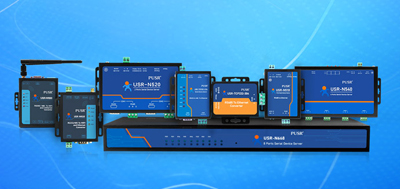
Network administrators want to reboot a remote office switch while traveling? Operations teams need to monitor multiple router Console ports simultaneously? A serial-to-ether net converter connects RS232/RS485 serial devices to TCP/IP networks, eliminating distance restrictions for remote management.
Console ports provide low-level management access to network equipment. Even when devices lack IP configurations, initial setup and troubleshooting require serial connections. The traditional approach connects a laptop directly to the Switch, Router, or Firewall Console port using an RS232 cable.
This method has clear limitations:
① Physical distance is restricted. RS232 effective range is approximately 15 meters. Large server rooms or distributed sites demand repeated trips.
② Multi-user access is difficult. A Console port connects to one terminal at a time. Engineers must wait in line.
③ Remote site response is slow. When equipment fails at a distant location, administrators must arrive on-site before they can operate.
A serial-to-ether net converter solves these problems. Connect the converter's RS232 end to the device Console port, connect the Ethernet end to the network, and access the target device's command line from any internet-connected location.
When a serial-to-ether net converter operates in TCP Server mode, it listens on a fixed port (usually 10001) on the Ethernet side. Multiple terminal computers connect as TCP Clients to this port, enabling multi-user access to a single Console port.
Deployment steps:
This approach suits operations teams needing multiple users to view device status. During server room inspections, the primary operator connects to the Console port while other engineers view output in real time from adjacent screens.
配合 virtual COM port software, a serial to ethernet converter maps remote RS232 devices to local computer COM ports. Terminal software operates the distant device as if connecting to a local serial port, compatible with all management software that lacks TCP support.
Deployment steps:
This approach feels more natural for administrators accustomed to terminal tools like SuperTerminal or TeraTerm, requiring no changes to familiar workflows.
Start with interface type. Network device Console ports use standard RS232, so select a serial converter supporting RS232. If simultaneous connection to instruments or PLCs is needed, consider whether RS485 support is required.
The following two products meet remote Console management requirements:
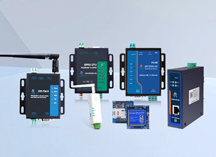
USR-TCP232-302 is a 1-port RS232 to ethernet converter supporting both virtual COM port software and TCP Client/Server dual modes. Powered by a Cortex-M7 core at 400MHz for fast response. Supports 5-36V DC wide-voltage input and hardware watchdog, automatically restoring network communication after power loss. Industrial temperature range -40℃~+85℃, suitable for cabinet or outdoor weak-current box deployment. Certified by CE, FCC, ROHS.
USR-DR132/DR134features compact dimensions, shaped like a lipstick tube, supporting DIN rail mounting or magnetic attachment. Also supports TCP Server mode with multiple simultaneous client connections. Configurable serial parameters with baud rates from 300bps to 921600bps. 4-layer PCB design and dual hardware/software watchdogs ensure long-term operational stability.
When sites require managing numerous Console ports, TCP Server mode products reduce deployment costs, as one serial converter serves multiple terminal access points.
Cabling planning.Keep RS232 cable length within 15 meters inside server rooms. Position the serial converter near the network rack and extend it via Ethernet cable. Cat5e cables support up to 100 meters, covering most server room wiring needs.
IP address management.Assign static IPs to each serial converter and document the correspondence between IP addresses and physical device locations in network records. DHCP allocation may cause device address changes, requiring search before next connections.
Network security.Console ports using default protocols without password protection present security risks. Connect serial converters to isolated management VLANs or restrict access source IPs via firewall rules. Some models support SSL/TLS encryption for wide-area network management.
Power reliability.For remote sites relying on serial converter power supply, select wide-voltage input models (5-36V DC) to adapt to different site power conditions. Watchdog-function products auto-reboot on freeze, reducing on-site maintenance visits.
Remote Console port access via serial to ethernet converter follows a core principle: convert physical serial connections to network communication. TCP Server mode suits multi-user collaboration scenarios, while virtual COM mode suits users accustomed to traditional terminal tools. Selection criteria include interface type, multi-client support, temperature range, and watchdog functionality. Proper IP planning and security measures ensure remote management stability and safety.
Q1: What network protocols do serial-to-ethernet converters support?
Mainstream serial-to-ethernet converters support TCP, UDP, Telnet, and FTP protocols. Some models additionally support Modbus TCP and MQTT IoT protocols. Console remote management typically requires only TCP protocol.
Q2: How many terminals can one serial-to-ethernet converter support simultaneously?
This depends on product specifications and configuration mode. Models supporting TCP Server mode usually allow multiple TCP Client connections. Common models support 4 to 16 concurrent connections.
Q3: What is the transmission distance of a serial-to-ethernet converter?
Once connected via Ethernet or Wi-Fi, transmission distance is unrestricted—any location with network access can connect. The RS232 physical cable should stay within 15 meters. The serial converter extends to network nodes via Ethernet cable.
Q4: What equipment can serial-to-ethernet converters work with?
Besides network device (switch, router, firewall) Console ports, they also support industrial instruments, PLCs, POS machines, medical equipment, and other devices with RS232 or RS485 interfaces.
Q5: How to ensure long-term stable operation of serial-to-ethernet converters?
Select products with hardware watchdog function, which auto-reboots on freeze. Industrial temperature range (-40℃~+85℃) and metal casing heat dissipation design suit harsh environments. Stable power supply and proper network configuration are also critical factors.
Q6: What is the difference between virtual COM mode and TCP mode?
Virtual COM mode creates a local virtual COM port, allowing terminal software to operate as if connecting to a local serial port, offering broad compatibility. TCP mode uses terminal software to connect directly to an IP and port without additional software, but the terminal software must support TCP connections.
Q7: Is configuration of a serial-to-ethernet converter complex?
Most products provide Web-based configuration interfaces. Access the device IP via browser to set network and serial parameters. Some models support client configuration software or direct serial connection configuration. Beginners typically complete basic setup within 10 minutes.
Q8: What is the difference between a serial-to-ethernet converter and a KVM switch?
A KVM switch switches video signals for monitors, keyboards, and mice, targeting Windows/Linux graphical interfaces. A serial-to-ethernet converter handles serial communication protocol conversion, targeting Console command lines, instrument data, and other serial device management scenarios.