A mountain solar plant has inverters spread across several ridges, with combiner boxes and revenue meters beside them, two cameras at the gate, a weather station along the ridge line, and an energy storage container at the foot of the hill holding a battery management system and air-conditioning controllers. There is no control room on site, no broadband line to pull in, and the nearest maintenance crew is two hundred kilometres away.
The networking problem at a site like this is not signal coverage. It is three things landing at once: sites are many and scattered, the equipment inside one site is mixed, and nobody is there when something fails. What usually carries those three is an industrial cellular router — one device that gathers everything at the site into a single uplink and hands it to a remote monitoring centre.
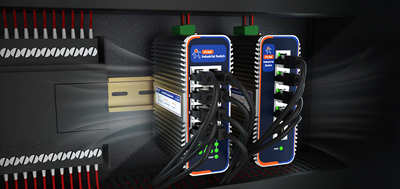
A photo of a new industrial router made the rounds in a technical community, and the discussion moved quickly from "what is this device" to how the cameras and laptops on site get connected.
Counting by interface works better than counting by equipment name. Inverters, combiner boxes and meters mostly run on RS485 with Modbus RTU; cameras and environmental sensors run on Ethernet; the battery management system in a storage cabinet often needs both; and transformer units and turbines still carry DI/DO for status and interlocks. The result is one table: how many serial ports, how many Ethernet ports, whether a fiber uplink is needed, whether IO points exist.
Serial ports need four parameters written down — baud rate, data bits, parity, stop bits — plus the Modbus station number. When those four do not match, a device answers a ping and still returns no data, which is the most common reason for a second site visit.
Power and mounting belong in the same note. Cabinet supplies are usually DC, and both 24 V and 48 V are common; the wide input range has to cover the actual voltage, and reverse-polarity protection absorbs the cost of a miswired connection. Where space is tight, size and mounting method are settled up front.
Where fiber or broadband can reach, use it. Where it cannot, cellular is the primary link, not something that comes second.
The practice is to leave room for every link: wired primary with cellular backup, or the other way round, with automatic failover when the primary drops. On the cellular side, dual SIM in a primary-standby pair, deployed across two carriers, removes single-operator dead spots. At unattended sites, failover time matters more than bandwidth — a slow switch looks like a gap in the data stream at the monitoring centre.
A dozen sites can still be configured one at a time; a hundred cannot. SD-WAN has become the mainstream way to network energy projects for practical reasons: leased lines cannot reach, the site count grows fast, and carrier and network conditions differ from site to site.
In concrete terms, it handles four things:
First, tunnels and policies are pushed centrally.A new site copies a template and joins the network; the architecture does not get rebuilt.
Second, Layer 2 transparency.Industrial Ethernet protocols pass over the public network directly, with no protocol conversion, so remote programming software can see the PLC and controller on the other side. Where programs have to be changed remotely, this is the one that saves the most work.
Third, path selection.A better path is chosen against real-time conditions, cutting jitter and packet loss across carriers. Remote work is real-time work, and this decides whether the experience holds up.
Fourth, authorization per device and per person.An outside contractor coming in to commission equipment gets only the matching device permissions, not the whole network.
On the device side, the counterparts are five VPN protocols (PPTP, L2TP, IPSec, OpenVPN, GRE) and a remote management platform. What the platform does routinely: batch parameter changes and firmware upgrades, remote login to the router's built-in web page, online status and signal quality, and offline, weak-signal and traffic-overrun alarms pushed by email or SMS.
The reason for sending someone is usually not a complex fault; it is that nobody can confirm the state remotely. What can be done remotely: change a collection interval, reboot an offline device, upgrade firmware across a batch of sites, check signal strength and traffic at a single site.
USR-G816fits remote sites with no broadband and a small device count: 5G SA/NSA, Qualcomm quad-core with the X62 modem, dual SIM (secondary slot can be an eSIM), one RS232/RS485 terminal port, one WAN (configurable as LAN) plus three gigabit LAN ports, metal housing rated IP30, −35 to 75 °C, 125 × 103 × 45 mm, DIN rail or wall mounting, hardware watchdog, wide-voltage terminal supply with reverse-polarity protection, five VPN protocols and automatic link failover, GNSS optional. Ridge-top positions, storage cabinets and unattended monitoring points fall into this group.
USR-G809sfits sites with more devices to connect, a fiber uplink, or local maintenance terminals: two WAN/LAN ports plus six LAN ports plus two SFP cages, Wi-Fi 6 dual band with up to 256 clients, dual Nano-SIM, one RS232 and one RS485, DI/DO, DC 9–60 V wide input with reverse-polarity protection, aluminium housing, DIN rail mounting, hardware watchdog, OLED display and USB/SD expansion, GPS/BeiDou.
USR-G806wfits small sites where cabinet space is tight: three Ethernet ports (one WAN plus two LAN, configurable as three LAN), dual Qualcomm chipset, −20 to 70 °C, 104 × 102 × 28 mm, redundant power through both a terminal block and a DC jack, software and hardware watchdogs, wall or DIN rail mounting, five VPN protocols.
Inventory.Interface table, the four serial parameters, supply voltage, mounting method.
Build a template.Configure VPN parameters, the collection policy and alarm thresholds at the first site, export them, and change only the IP address and site number elsewhere.
Rehearse the link.Pull the primary link and watch whether failover happens, how long it takes, and whether data catches up afterwards.
Close the permissions.Who may log in remotely and which devices they can reach goes into the handover document; alarm recipients are confirmed at the same time, so alarms do not go out to nobody.
Scattered sites are a given; the number of visits each site needs is not. An industrial cellular router pulls the interfaces, links and permissions inside one site into a single device, and SD-WAN pulls a hundred such devices into one manageable network — the first answers remote locations, no wired line and harsh conditions, the second answers the point where sites become too many to handle one by one.
1. How is an industrial cellular router different from an ordinary enterprise router?
The difference is interfaces and environmental tolerance. Industrial models keep field interfaces such as RS232/RS485 and DI/DO, take a wide input voltage with reverse-polarity protection, and carry wide temperature range, a metal housing, a hardware watchdog and EMC protection, with DIN rail mounting. Ordinary routers are built around Ethernet and USB ports for indoor temperature and stable mains. Energy sites run on cabinet DC that fluctuates and stay unattended for months, and those are exactly the items that separate the two.
2. A site already has broadband. Is a cellular link still needed?
Yes, keep one. When broadband drops, a cable is cut by excavation, or a site loses power during works, cellular is the only channel left that can confirm what is happening. At remote sites with no broadband, cellular is the primary link. The two act as backup for each other with automatic failover, and the switch is worth verifying once by unplugging the primary link before the site goes live.
It depends on what the site has to carry. Inverters, meters and sensors move small amounts of data on a collection interval measured in minutes, and 4G is enough. Camera video, remote commissioning and program downloads want the bandwidth and latency of 5G. Mixing the two across one fleet of sites, graded by how important each site is, is also common.
4. How many routers does one site need?
Interface count decides it, not site size. A small site with few devices and tight cabinet space needs one three-port model. A site with more devices, a fiber uplink, or local maintenance terminals takes a multi-port model with SFP. Remote points with no broadband take a 5G model. When the count still falls short, expand onto a switch rather than starting with a stack of routers.
5. What is dual SIM for?
When coverage on one carrier degrades, the router moves to the other card. Running the two slots on different carriers removes single-operator dead spots, and traffic can be split between tariffs. At unattended sites the failover and weak-signal alarms should be switched on as well, otherwise a degraded link tends to surface only as a gap in the data.
6. Are SD-WAN and VPN the same thing?
No. VPN provides the encrypted tunnel; SD-WAN does the orchestration on top of it — policies pushed centrally, path selection against real-time conditions, authorization per device and per person. With few sites, configuring VPN alone is enough. Once the count reaches dozens or hundreds and every site has a different carrier, SD-WAN is what turns the set into one network that can be managed.
7. Is data lost while the link is down?
That depends on the buffering and retransmission built into the collection device and the platform. What can be confirmed at the router is whether failover takes effect, how long it takes, and whether data catches up after recovery. All three are visible in one rehearsal before commissioning, which is easier than troubleshooting site by site afterwards.
8. What can remote O&M do, and how is it kept secure?
Remotely: change a collection interval, reboot an offline device, upgrade firmware across a batch of sites, view online status and signal quality, with offline, weak-signal and traffic-overrun alarms pushed by email or SMS. Access runs over encrypted tunnels with no ports exposed to the public network, permissions are granted per device and per person, and outside contractors get only the device permissions they need. Physical work — replacing parts, rewiring, cleaning — still needs someone on site.