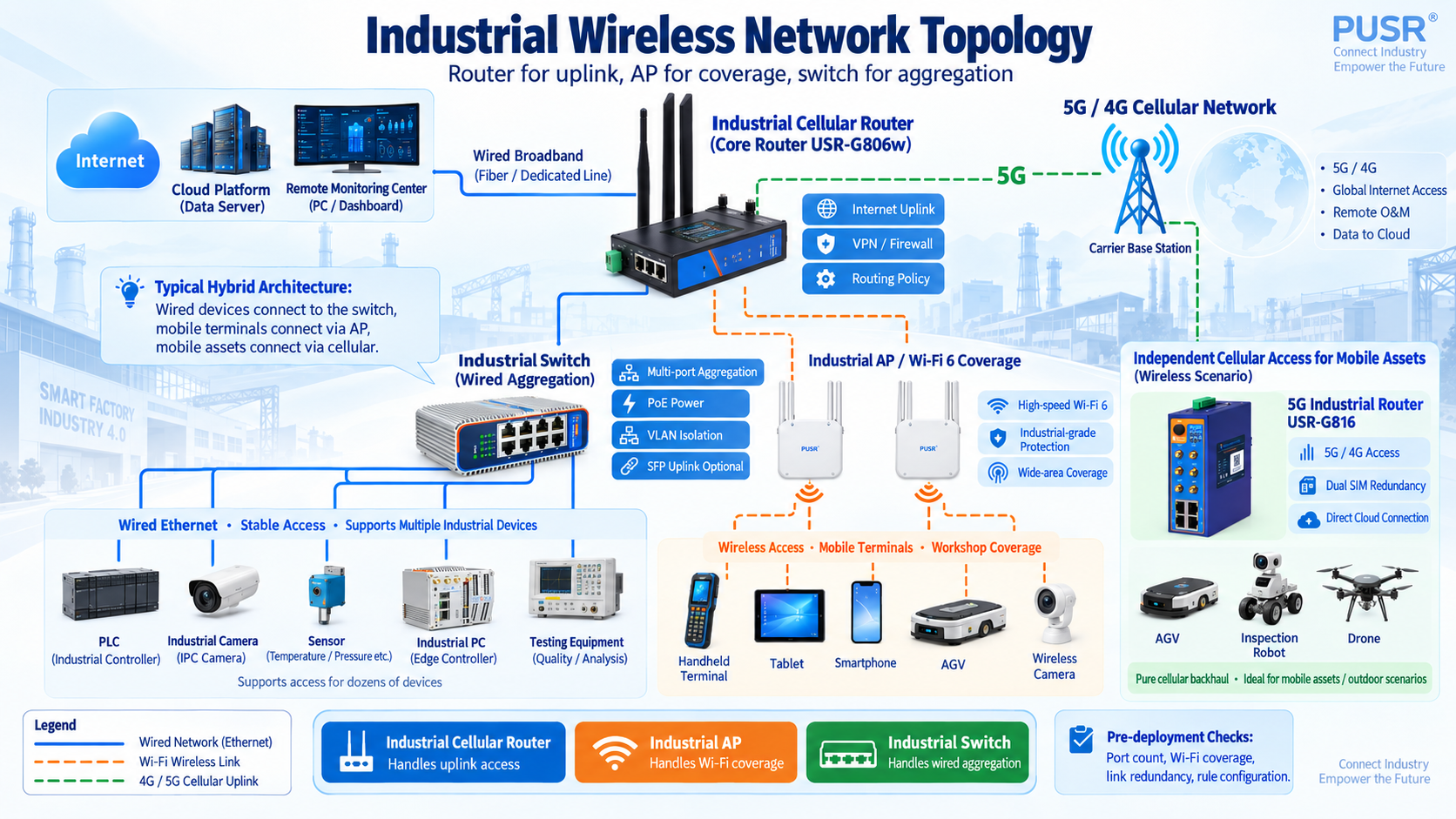
On a production line, a industrial cellular router sends data out of the plant, Wi-Fi coverage keeps inspection terminals online, and a switch provides a wired backbone for dozens of cameras and PLC. This is the most common network architecture in industrial environments.
Three pieces of equipment, each with a distinct role. But they are frequently confused when purchasing. A common question is: an industrial cellular router only offers WAN and cellular access—how do field devices and personnel connect?
The answer is combining a router, an industrial AP, and a switch, with each device handling different tasks.
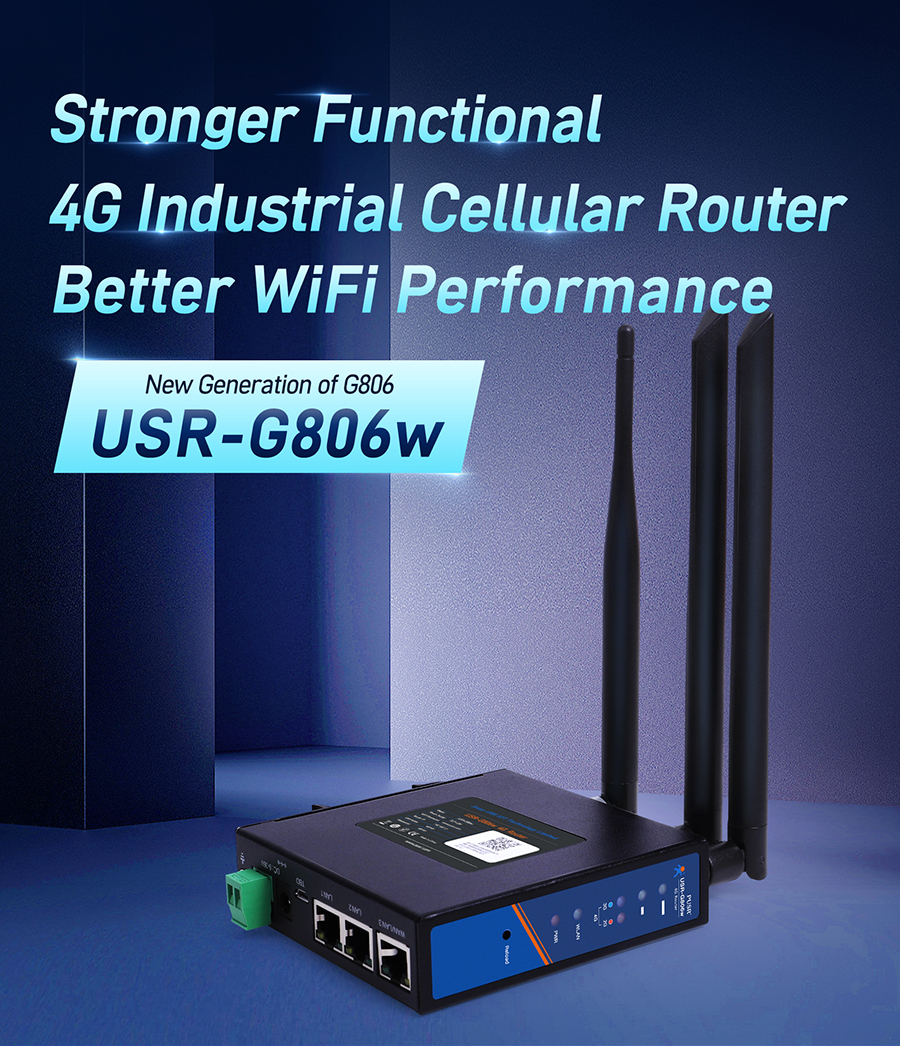
Industrial cellular routers deliver connectivity out of the local network. They route field data via 4G/5G cellular or wired broadband to the cloud or a remote monitoring center, with built-in firewalls, VPN tunnels, and routing policies. They do not provide Wi-Fi coverage; field devices cannot connect to them wirelessly.
Industrial AP sdeliver wireless coverage. They broadcast Wi-Fi signals so handheld terminals, cameras, and AGV can join the network. They do not route traffic to the internet themselves; data passes through the router or switch.
Industrial switches deliver wired aggregation. They provide stable multi-port connectivity for dozens of devices (PLCs, cameras, sensors, industrial PC), with some models supporting SFP fiber uplinks and PoE power.
Buying the wrong combination leads to dead ends: a router that cannot cover the floor, an AP with no path to the internet, a switch with no cellular uplink.
Industrial gateways add data acquisition on top of routing. They read serial devices (RS485/RS232) and I/O modules, perform protocol conversion, and report upstream. If the field only has Ethernet devices, a router is sufficient.
Industrial modemsonly modulate and demodulate signals. They lack routing, switching, and Wi-Fi capabilities. Modern industrial projects rarely deploy standalone modems; cellular routers have this function built in. Modems were once the standard for connecting field equipment to cellular networks, but the convergence of modem, router, and firewall into a single enclosure has made them obsolete for new installations.
A frequent question: if a router has LAN ports and an AP can bridge, why buy a switch separately?
Three reasons.
Port count.Routers typically offer 14 Ethernet ports, far fewer than dozens of cameras and PLCs require. Switches provide 424 ports, some with SFP fiber uplinks.
PoE power.Switches can power IP cameras and APs directly, eliminating separate power wiring on site. PoE eliminates not only cabling costs but also the need for local power outlets near ceiling mounts and equipment racks—two expenses that add up quickly in large installations.
Network isolation.Switches support VLAN segmentation, separating production, monitoring, and office networks to prevent broadcast storms.
A single industrial cellular router suffices. The USR-G806w offers 3 Gigabit ports, built-in Wi-Fi (300Mbps), 5 VPN protocols (OpenVPN, IPSec, PPTP, L2TP, GRE), -20~70°C wide temperature range, DIN rail or wall mount—adequate for small-to-medium connectivity. The dual power input (terminal block and DC jack) provides redundancy for continuous operation.
This is the typical scenario where an industrial cellular router alone cannot cover the floor. Inspection staff move between production lines with handheld terminals, AGVs roam freely, and fixed cameras stream video continuously—these devices need either wired connections or Wi-Fi coverage.
Router + industrial AP + switch. The USR-G809s is the workhorse here: 2 SFP + 8 RJ45 Gigabit ports (10 total), Wi-Fi 6 dual-band (2976Mbps), 256-device capacity, GPS/BeiDou positioning, DI/DO, 8GB storage, and Python secondary development. As the core router, it connects to a switch for PLCs and cameras, while APs cover inspection terminals and AGVs. Wi-Fi 6 2x2 MIMO remains stable in metal-heavy workshops with severe interference. AP, relay, and bridge modes switch according to site layout.
Pure cellular routing. No Ethernet cable? 4G/5G handles the uplink. The USR-G816 supports 5G SA/NSA, dual SIM redundancy, optional GNSS (GPS/BeiDou/Galileo/GLONASS), and 5 VPN protocols—suited for AGVs, inspection robots, and drones. The built-in watchdog ensures self-recovery after crashes, a critical feature when the device is mounted on moving equipment where manual resets are impractical.
Large factories and campuses commonly use this architecture: fixed production lines go wired, mobile terminals go Wi-Fi, outdoor assets go cellular. All three pieces come together.
The core router (USR-G809s) handles internet access and global rules, a switch aggregates PLCs and cameras, APs cover inspection terminals and AGVs, and mobile assets connect independently through a cellular router (USR-G816). Zone-based networking: terminals use Wi-Fi, devices use wired, mobile assets use cellular. Multi-link backup ensures seamless failover between wired and cellular, with automatic outage alerts pushed by SMS and email.
First, port count. Inventory every device to connect: how many Ethernet ports, how many serial ports (RS232/RS485/RS422), how many fiber ports. Leave a 20% headroom. The USR-G806w with 3 ports fits small sites; the USR-G809s with 10 ports fits medium-to-large ones.
Second, Wi-Fi coverage. AP quantity and placement depend on wall materials and obstacles on site. Metal-dense areas suffer severe signal attenuation; a site survey is recommended. Wi-Fi 6 outperforms Wi-Fi 5 in coverage and anti-interference, but thick concrete walls still require additional APs.
Third, uplink reliability.Build redundant backup between wired, cellular, and Wi-Fi. The 5G cellular router USR-G816 offers dual SIM + wired/cellular failover; the USR-G809s switches between cellular and wired quickly. Data continuity is essential.
Fourth, rules configured. Firewall traffic rules, VPN parameters, and remote management access should be set before deployment. Device access rules are written by source (source IP or source MAC—pick one, leave the other blank). Remote management uses encrypted tunnels; public ports stay exposed. Rules require a device reboot to take effect, so testing the configuration in a controlled environment before full rollout saves time on site.
Industrial wireless networking is not about buying the most expensive equipment. It is about distributing three tasks—internet access, coverage, and aggregation—to the right devices. A 5G cellular router manages the uplink, APs manage coverage, switches manage aggregation. Each plays its role, and the network holds steady.