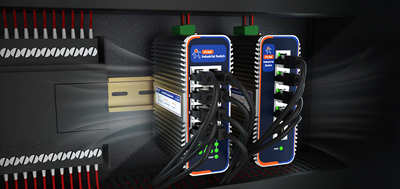
The industrial 4g router that ships inside a machine usually has one job on delivery day: get the data out. Three years later, the same requests tend to show up: the customer wants to switch carriers, the signal has dropped and the antennas need to move, or a new row of equipment has been added to the line. The machine itself still has five years left. What gets replaced is the box in the cabinet.
All-in-one designs get criticized here: the part that needs updating cannot be changed, so the whole unit goes. One comment called a product without upgradability a boat anchor - the part worth updating could not be swapped, and after the next generation arrived, newer features stopped being compatible too.
The account worth doing is a different one:long-term cost is not in the purchase price. It is in how much has to be replaced along with the next change.
The first is the hardware price, visible on the quotation. The second is the site visit and the downtime; when the site is several hundred kilometers away or the line has to stop first, this one often exceeds the hardware itself. The third is re-approval and documentation: space in the cabinet and the rail position, power wiring labels, device addresses and firewall rules, the access paperwork required by the customer's IT department. Changing the unit means going through all of it again.
Of the three, only the first is visible at the purchasing stage, which is why replacing one unit takes two days on some projects and two weeks on others.
The parts inside a communication device do not age at the same rate: cabinet and mechanical hardware sit still for eight to ten years, the cellular generation follows the carriers, wireless and endpoint formats move faster, and antennas may need to move at any time because of metal structure on site. The more parts that can be replaced individually, the smaller the blast radius of a single change. On real devices, four layers can be handled separately today.
Antennas.External antenna connectors are the easiest layer: weak signal, thin coverage, a cabinet in the way - fit a higher-gain antenna or move the mounting position, and the main unit stays put. The USR-G806w ships with two Wi-Fi rubber antennas and one LTE rubber antenna on 2 x RP-SMA-K connectors; the number of cellular antenna connectors on the USR-G809s varies by version (two SMA-K on the 4G version, four on the 5G version), plus two RP-SMA-K for Wi-Fi and one for positioning.
Carrier.The value of dual SIM plus eSIM is not the extra card; it is that switching carriers does not mean switching hardware. On the USR-G809s, SIM2 is a built-in eSIM and an inserted physical card takes priority; the USR-G816 is also dual SIM, with SIM2 optionally a built-in eSIM. On projects that span regions or hit local coverage gaps, this layer removes one full replacement.
Uplink form.Port roles that can be reassigned matter more than port counts. The USR-G806w ports can be configured as 1 WAN + 2 LAN or 3 LAN, and the WAN port on the USR-G816 can also be reassigned as LAN; the USR-G809s adds two SFP fiber ports (one of them shared with a copper port), so when the distance between cabinets exceeds what copper allows, the link moves to fiber and the unit stays.
Function and capacity.This layer changes without touching hardware: the remote management platform handles parameter changes, reboots, and batch firmware upgrades from off-site, and the USR-G809s adds USB and SD card slots for extra storage. Firmware and configuration no longer wait for a site visit - the most underestimated line in the cost sheet.
The hardware difference is the easiest: put two quotations side by side. Downtime is counted in production hours - ask how long one replacement stops the line and whether it has to wait for a maintenance window. The re-approval line goes to the customer's IT team: does a different model need access approval again, and do addresses and rules need rebuilding?
The total often runs against intuition:in the cost of replacing a whole unit, the hardware price is usually less than half.Which is why it is worth favoring the model with more replaceable parts, even at a slightly higher unit price.
USR-G816: 5G SA/NSA with the Qualcomm X62 modem, four auto-sensing Gigabit ports (WAN reassignable as LAN), dual SIM redundancy with SIM2 optionally a built-in eSIM, Wi-Fi 5 dual-band 2x2 MIMO; DC 9-36 V with reverse polarity protection, -35 to 75 °C, IP30, 125 x 103 x 45 mm, DIN rail or wall mount. Use it where fiber cannot reach or the equipment travels; both the carrier and the port roles are left open.
USR-G806w: Fast Ethernet ports, 2.4 GHz 802.11b/g/n at 300 Mbps, 2 x RP-SMA-K antenna connectors; terminal block and DC jack redundant power, -20 to 70 °C, IP30, 104 x 102 x 28 mm, DIN rail or wall mount. Suited to small points where cabinet space is tight and changes concentrate on antennas and power.
USR-G809s: 2 x WAN/LAN + 6 x LAN + 2 x SFP (one SFP shared with a copper port), RJ45 auto-sensing 10/100/1000 Mbps; Wi-Fi 6 dual-band 2x2 MIMO, up to 256 clients, offered in 4G + Wi-Fi 6 and 5G + Wi-Fi 6 versions; dual Nano-SIM with SIM2 as a built-in eSIM, USB and SD card slots for extra storage; DC 9-60 V, -25 to 75 °C, IP40, 118 x 96 x 49 mm. Of the four layers, it leaves a replaceable part at every one - the first choice for sites that expect further changes.
① List of replaceable parts: antenna connector type and count, which slot is SIM and which is eSIM, default port roles - written into the outgoing documents so the next person does not start from scratch.
② Margin on power and mounting: leave room in the cabinet for antennas and cabling, size the supply to the voltage actually on site, use terminals with reverse polarity protection.
③ Plan addresses and rules once: allocate the address range once with room to grow, write rules by source and destination, so a later change touches one place.
④ Spare unit and image: keep one spare of the same model, archive the configuration and firmware version at commissioning, and a replacement does not need to be configured from scratch.
Modularity in industrial communication equipment does not mean turning the mainboard into a plug-in card; it means the layers that change can be changed on their own. When specifying an industrial 4g router, writing "what will the next change touch?" into the request for quotation saves more than comparing spec sheets line by line.
1. What is the difference between a modular industrial router and a regular one?
Not whether the mainboard can be swapped, but whether the layers that change can be handled on their own: are the antenna connectors external and replaceable, can SIM and eSIM move to another carrier, can port roles be reassigned, can firmware be upgraded remotely in batches. These decide whether the next change means one accessory or the whole unit.
2. Already running a 4G router - is 5G worth it?
It depends on bandwidth and uplink. Status values and minute-level telemetry are usually fine on 4G; video, bulk firmware distribution, or a customer asking for higher uplink justify the move. When the same model comes in both 4G and 5G versions, changing version is far easier than changing brand - cabinet mounting and configuration carry over.
3. Can the antennas be replaced on their own?
On models with external antenna connectors, yes. The USR-G806w uses 2 x RP-SMA-K and ships with two Wi-Fi antennas and one LTE antenna; the USR-G809s has two SMA-K cellular connectors on the 4G version and four on the 5G version. Fitting a higher-gain antenna or repositioning it costs far less than replacing the router.
4. Does switching carriers mean new hardware?
Not on models with dual SIM and eSIM. On the USR-G809s, SIM2 is a built-in eSIM and an inserted physical card takes priority; SIM2 on the USR-G816 can also be a built-in eSIM. Confirming the frequency-band version for the target region before buying saves more trouble than replacing hardware later.
5. When do the SFP ports earn their keep?
When the distance between cabinets or buildings exceeds what copper allows, or where heavy electrical interference is present. The USR-G809s carries two Gigabit SFP ports, one shared with a copper port - copper for short runs, fiber for long ones, on the same device.
6. Does a firmware upgrade require a site visit?
No. The remote management platform handles parameter changes, reboots, and batch firmware upgrades from off-site, and alarms push for offline devices, weak signal, and traffic overrun. What actually requires someone on site is physical work: swapping parts, rewiring, cleaning out dust.
7. Can the existing configuration carry over to a new model?
Between models in the same series, usually yes - mounting, terminal power, serial and Ethernet layout are close, and address planning and rule logic transfer directly. Archive the configuration and firmware version at commissioning and import them into the replacement.
8. Models with more replaceable parts cost more. Is it worth it?
It comes down to the three costs: hardware difference, site visit and downtime, re-approval and documentation. On projects with scattered sites, remote locations, or a long IT approval process, the last two usually exceed the hardware difference, and the model with more replaceable parts comes out ahead.