A portable travel router released recently builds its pitch around staying connected away from home: the uplink takes a wired port in a hotel room, joins a nearby wireless network and completes its captive portal login, or runs off a phone's USB tether. Three uplinks stay on standby, one carries traffic at a time, and the other two wait as backup.
That arrangement suits travel: the connection is borrowed and left behind a day or two later. Move it onto a machine expected to sit inside a customer's plant for seven or eight years and the question changes: who owns this link. Whether field equipment gets a SIM card is rarely about signal strength, but about whether that link stays under the same control as the machine. 5G cellular router built for industrial sites answers that question.
Trouble with a network borrowed from the customer rarely shows up on commissioning day.
The Wi-Fi password belongs to someone else, and the SSID changes whenever that side decides. A network behind a captive portal needs a person to click through after every reboot. The address on a customer-owned port is assigned by their side, and opening a port runs through their IT process. Network upgrades and expiring accounts never reach the equipment at the far end. A phone hotspot depends on one person's handset, battery and plan.
Borrowed connectivity is fine for commissioning, where one connection at power-up is enough. Machines that stay on site are different: the day the link drops is usually the day the data matters most. One test settles it: will this unit be here longer than a quarter. Past that, the link belongs in the same hands as the equipment.
Three kinds of sites treat broadband as not worth pulling rather than not yet pulled.
New and temporary sites: a site office on a construction project, an open storage yard, a leased workshop. Construction runs in weeks while activating an IoT SIM takes minutes, and the equipment moves on when the project ends.
Scattered remote points: inverters on a hillside, monitoring stations along a river, chargers at the roadside, valve chambers along a pipeline. A point like that often carries three to five I/O signals or one serial device, so a leased line is out of proportion.
Assets that move: service vehicles, patrol boats, in-plant AGVs, mobile inspection vans. Nothing is fixed, and cellular is close to the only option.
Across those three cases cellular is the primary link. Two details get missed. The APN on a private-network SIM must be entered correctly: left blank, the modem never registers, which gets misread as no coverage. And the antenna should not stay inside a metal enclosure, since the cabinet itself attenuates signal, with a measurable difference once it moves outside.
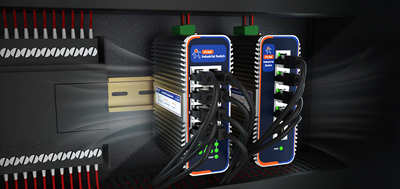
The USR-G816 covers this class of site. 5G NR in both SA and NSA modes on a Qualcomm X62 module; dual SIM with the second slot optionally a built-in eSIM; one Gigabit WAN port (reassignable as LAN) plus three Gigabit LAN ports, plus RS232/RS485 terminals for nearby serial equipment; DC 9-36 V input with reverse-polarity protection, metal housing rated -35 to 75°C, DIN rail or wall mounting. Ethernet, cellular and Wi-Fi back each other up automatically. The bundled remote management platform handles configuration changes, reboots and firmware upgrades from off site, with three classes of alarms pushed to email and SMS.
When a site can reach real broadband, cellular need not compete for the primary slot.
The deciding factor is the cost of an outage, not bandwidth. Copper cut by a contractor, a fault at the upstream carrier, a switch replacement on the customer side: rare events, but the difference between a line waiting on connectivity and one retransmitting data is large. One hour of downtime set against one SIM card's monthly fee usually settles the question.
Wired takes the primary role and cellular sits behind it, with the switchover verified once at commissioning: pull the Ethernet cable, time the recovery, and watch whether the application retransmits or stalls in that window. One more thing to settle in advance: whether data collected during the switchover is buffered on the device and replayed afterwards, or filled in by the platform. If neither side handles it, that stretch is gone.
The USR-G809s fits sites with plenty of wired equipment: two WAN/LAN combo ports plus six LAN ports plus two SFP cages (one shared with a copper port), so in-cabinet traffic stays on copper while a run to another electrical room goes onto fiber. Dual Nano SIM with the second slot a built-in eSIM, external card taking priority. Wide 9-60 V DC input with reverse-polarity protection, DIN rail mounting. Site-to-site networking is offered free, so remote access works without a public IP address.
Both take a SIM card and reach the internet; the difference is not speed but how long each stays where it is put.
That portable unit comes in a polycarbonate shell rated -10 to 40°C, powered over USB-C, and answers "internet wherever a person is." The industrial side answers "internet where this machine sits, for eight years": the housing becomes metal, the temperature range opens to -35 to 75°C, power moves to a wide-range terminal block taking 24 V straight from the cabinet with reverse-polarity protection, mounting must clip onto a DIN rail or bolt to a wall, and surge, ESD and EFT protection plus a watchdog bring the unit back after a power event or lockup.
The USR-G806w suits cabinets where space is tight: 104×102×28 mm, DIN rail or wall mounting, -20 to 70°C, redundant power through a 2-pin terminal block and a DC jack, Mini SIM slot. Cellular, wired and Wi-Fi uplinks switch freely: cellular steps back to backup where broadband exists, and takes over where it does not.
Three decisions belong before the order goes in.
Switching carriers: dual SIM plus eSIM exists for this. When coverage degrades or a plan cannot be renewed, swapping the card is enough, with no hardware change and no truck roll.
Moving antennas: pick a model whose cellular antennas keep external SMA connectors, so later adjustments touch the antenna only. Measure signal at the mounting position inside the cabinet before buying, rather than estimating from outside it.
Counting data: estimate monthly volume from the reporting interval and message size, then set a threshold alarm on the device rather than waiting for a plan to run dry and finding some unit reconnecting constantly.
Where broadband cannot reach, where points sit too far apart, or where the equipment moves, cellular is the primary link. Where broadband exists but an outage is unacceptable, cellular is the backup. What remains is the enclosure: metal housing, wide voltage, wide temperature, DIN rail, decided by how long the equipment stays there. Checking a 5G cellular router against those three conditions beats comparing throughput figures alone.
1. What separates a SIM-based industrial router from a consumer 4G cellular router?
The difference is whether it can stay on site. Industrial units bring a metal housing, wide temperature and voltage ranges, DIN rail or wall mounting, reverse-polarity protection, a watchdog, and surge plus ESD protection, powered from cabinet DC rather than an adapter. Consumer units are built around an indoor desktop environment, and their temperature range and enclosure material follow from that.
2. With fixed broadband already in place, is a cellular router still worth it?
Judge by the cost of an outage rather than bandwidth. Broadband goes down from contractors cutting cable, upstream carrier faults and customer-side switch work. Rare, but the outcome is the difference between a stopped line and a retransmission. Once downtime costs more than a SIM card's monthly fee, cellular as a backup link pays for itself.
3. How does configuration differ between cellular primary and cellular backup?
Primary-link deployments carry two extra checks: the APN on the private-network SIM is filled in correctly, and the antenna is brought outside the cabinet. Backup deployments get one commissioning test: pull the Ethernet cable once, time the recovery, and confirm whether data collected during the switchover is buffered on the device or replayed by the platform.
4. eSIM or a physical SIM card?
Both can coexist: an external Nano SIM takes priority, with a built-in eSIM as the second slot. Changing carriers or adding a card then needs no disassembly, and cross-border projects can be provisioned locally.
5. Coverage is weak on site. Is a higher-gain antenna the answer?
Check where the antenna sits first. A metal cabinet attenuates signal on its own, and the measured gap between inside and outside is often large, which usually beats swapping antenna gain. If signal is still weak after moving outside the cabinet, relocation or a different carrier comes next.
6. What is a reliable way to estimate monthly data volume?
Multiply the reporting interval by message size for one device, multiply by the device count, then leave headroom for reconnects and firmware upgrades. Set a data-limit alarm on the device at roughly 70 to 80 percent of the plan, rather than discovering the problem when service is suspended.
7. Equipment is already installed. How is failover verified?
Pull the cable carrying the primary link, time the recovery, and watch whether the application retransmits or stalls during that window, plus whether collected data arrives afterwards. The record of that test is the acceptance documentation.
8. Units are spread across several cities. How does remote maintenance work?
A remote management platform handles batch configuration changes, reboots and firmware upgrades, backed by alarms for offline status, weak signal and data-limit breaches. Where remote access is needed for commissioning, a model supporting site-to-site networking reaches devices without a public IP address.