A 10 GB SIM plan runs dry before the month is over, and the site goes offline with it. The first reaction on site is usually poor signal or a billing error by the carrier. More often, one device behind the router has been sending data out continuously, and nobody knows which one.
Traffic management is rarely hard because of the total. It is hard because the total cannot be traced back to a source. When the same SIM sits in a 5G cellular router, uplink bandwidth is larger, so a single device behaving badly can consume a month's allowance in a few days. One engineer listed what typically gets connected on a site: a row of cameras, plus the field engineers' laptops. Those two categories are also the most common entries on a data bill.
Before opening any device list, look at how the usage grew. Two things need separating: whether the absolute figure is genuinely over the plan, and how fast it is climbing. Some sites were under-provisioned from the start, and once a few cameras are added, running out of data is an expected outcome rather than a fault. What needs investigating is a curve steeper this month than last month on the same set of devices. Keeping one normal month's curve as a reference helps: heartbeat packets, clock synchronisation and small amounts of telemetry form a baseline, and a stable baseline needs no attention.
Matching the shape narrows the search from every device on site to one category.
Sorting devices by who actively transmits is clearer than sorting them by name.
Write the list down once: device name, which interface it attaches to (Ethernet, serial or Wi-Fi), IP or MAC, permitted destinations, reporting interval. Every rule and every isolation step afterwards starts from this list.
Disconnect method, the most direct one.In the router's web interface, go to Firewall, then Communication Rules, and create a forwarding rule. Set the source zone to lan and the source address to the IP of the device under test; when matching by MAC instead, the source IP field has to be left blank, because the two cannot both be filled. Set the action to Reject, then Apply and Save, and perform a reboot from the System menu, since the rule does not take effect until then. Disconnect one device at a time and watch whether the total curve drops; when it drops, that is the culprit. Start with the highest-throughput units, cameras and host computers first, one at a time, and half an hour of observation is usually enough to see the difference.
Rate-limit method, for when service cannot be interrupted.Rate Limiting under the firewall menu can be set by IP range or by MAC. Give the suspect device a cap that still lets it work but does not let it fill the pipe, then watch the total again.
Whitelist method, for when destinations are not fixed IPs.Under Firewall, then Access Restrictions, select whitelist mode and enter only the domains the application needs. One default is worth remembering: selecting whitelist without adding any rule means the whitelist is empty and every domain is blocked.
Verification takes a single step: devices on the list reach their destinations, devices off the list do not. That doubles as the acceptance test for the rule set.
Set the alarm threshold at 70 to 80 percent of the plan allowance rather than right at the cap. The USR-G816 raises a traffic-overrun alarm; device offline, weak signal and traffic overrun can all be delivered by email or SMS, with repeated push supported, and through the remote management platform they are visible without travelling to the site.
Make the rules a template: name allow-rules after devices, permit them one by one, put a catch-all reject at the end, and change only the destination address and port when moving to another site. Heavy operations such as fleet firmware upgrades and video replay belong in a wired window or at night; anything that can stay on the LAN side should not take uplink capacity. Where a site can get fixed broadband, make the wired link the primary path and cellular the backup, since the USR-G816 supports automatic WAN failover; everyday traffic then runs on the wired line and cellular only covers outages.
Reconcile once a month: put this month's curve, the alarm records and the changes to the device list side by side. A device added or a reporting interval changed will show up in the next month's curve.
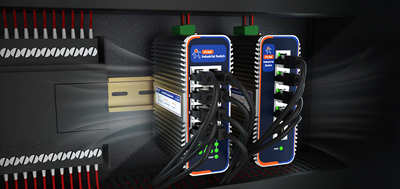
USR-G816, primary 5G uplink: Qualcomm quad-core processor with X62 modem, SA and NSA, one WAN port (configurable as LAN) plus three gigabit LAN ports, dual SIM with SIM2 optionally as a built-in eSIM, RS232 and RS485, DC 9-36 V with reverse polarity protection, -35°C to 75°C, metal housing rated IP30, DIN rail or wall mounting, hardware watchdog. Faster uplink makes the threshold alarm more necessary, not less.
USR-G806w, tight cabinet space: 104 × 102 × 28 mm, two-pin terminal plus DC jack for two power inputs, three internet paths (cellular, wired, Wi-Fi) that can be switched, up to 20 Wi-Fi users, -20°C to 70°C. Communication rules and rate limiting under the firewall handle cutting off the source and capping the bandwidth.
USR-G809s, many devices on site and local recording to keep: 2 × WAN/LAN + 6 × LAN + 2 × SFP, USB and SD card expandable storage, DC 9-60 V, DIN rail mounting. Local traffic stays on the LAN side instead of taking uplink capacity.
In the end, over-consumption rarely turns out to be a broken device. It turns out to be a device doing something nobody authorised it to do. With the usage curve, the device list and the disconnect rules in place, every megabyte on a 5G cellular router has an owner.
1. What separates an industrial router from a consumer router on data management?
Whether control reaches an individual device. Consumer routers generally stop at bandwidth limits and access schedules. In an industrial router, communication rules under the firewall allow or reject traffic per source IP or source MAC, rate limiting works per IP range or per MAC, and a traffic-overrun alarm plus a remote management platform makes "which device used how much" an answerable question.
2. Do cameras always exhaust a data plan?
Not always, but they are the most common entry on the bill. How much they consume depends on bit rate, whether footage goes to the cloud, and whether streams are previewed or replayed remotely. Two practices help: keep recordings local and access them over the LAN, and where remote viewing is genuinely needed, rate-limit the camera so it cannot take the whole uplink.
3. Rate limiting or disconnecting first?
It depends on whether service can stop. During a maintenance window, the disconnect method gives the fastest answer. When downtime is not acceptable, apply rate limiting first, push the suspect device down to a level that still works but cannot fill the pipe, then watch the total. If more than one device is suspect, disconnect one per day and compare the drops in the curve.
4. Why did everything stop working after the domain whitelist was enabled?
When whitelist mode is selected without any rule added, the whitelist is empty, so every domain is blocked. The symptom looks like a device failure but is simply the default. Adding the required domains restores access. Where destinations are fixed IP addresses, writing them into communication rules is more direct.
5. Is there a warning before the plan is used up?
Yes. The traffic-overrun alarm fires on a threshold, and setting that threshold at 70 to 80 percent of the allowance leaves enough room to act. Delivery by email and SMS is supported, and repeated push keeps a single missed notification from being the end of the story.
6. Does traffic accumulate while the link is down?
No cellular traffic is generated during the outage itself, but some devices retransmit buffered data after reconnecting, and that retransmission lands on the bill. The reporting policy and the retransmission window are worth confirming before commissioning, especially on sites where the link drops often.
7. With a 4G router already installed, is moving to 5G necessary?
It depends on uplink demand. Video, frequent remote program downloads, and a growing device count will make 4G uplink the bottleneck first. Minute-level status values and telemetry are fine on 4G. After moving to 5G, uplink is faster and the allowance is consumed faster as well, so the threshold alarm sh