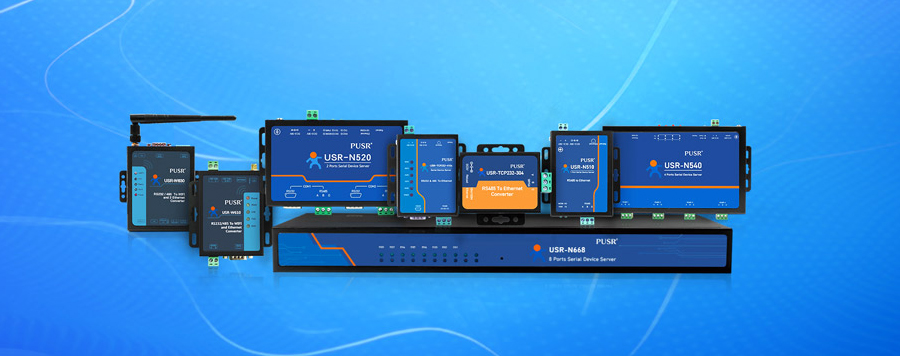
Serial to Ethernet converter is a small-sized IoT device that can convert IP/TCP data package into RS232, RS485, and RS422 serial data. Serial to Ethernet converter can also be called serial device server, different sizes.
Serial to Ethernet converter has one and multiple serial ports or maximum 25 serial ports. Standard panel-mounted serial to Ethernet converter is the most common. Still, DIN mounts are also available so that they can be easily mounted on standard DIN rails. It can also be used as a wireless converter. In such condition, IP/TCP data packet are transmitted over IEEE 802.11a/b/g network link. Some serial to Ethernet converters only have RS232 serial ports, others have RS232 and RS485 serial ports, while there are some serial to Ethernet converters have 3 built-in serial ports (RS232, RS485, and RS422).
Commonly, serial to Ethernet converter is used to connect serial port RS232, RS485, or RS422 devices (such as serial port printers, barcode scanners, scales, GPS, sensors, or any other device with a serial port interface) to a computer over a standard LAN network. The benefits are obvious. You can remotely control, monitor, and communicate with serial port devices from the central computer.
Serial to Ethernet converter can transmit IP/TCP data packet into serial data and transmit serial data into IP/TCP packets bidirectional. Before you are using the serial to Ethernet converter, you need to install the driver software on your computer. This driver software is also called virtual COM software because it creates virtual COM ports in the computer's device manager when the converter connects to the computer. Virtual COM software is usually included in the converter if you buy it from a reputable seller.
Aserial to Ethernet converter(also called aserial device serverorterminal server) is an IoT networking device that bridges traditional serial interfaces (RS-232, RS-422, RS-485) to modern Ethernet (TCP/IP) networks. It enables legacy serial devices—such as PLCs, barcode scanners, GPS units, industrial meters, scales, and sensors—to communicate over a standard LAN or WAN without replacing the original equipment.
The converter performs two-way data translation:
Unlike protocol gateways, standard serial-to-Ethernet converters providetransparent transmission—meaning the data payload is not modified during conversion, so existing serial communication software can run unchanged.
Serial-to-Ethernet conversion is not a simple physical-layer change. It involves protocol translation across multiple OSI model layers.
Serial standards like RS-232, RS-485, and RS-422 define:
Ethernet provides physical and data-link layer connectivity. TCP/IP adds:
The converter's firmware executes the following workflow:
① Serial interface receives byte stream from connected device
② Firmware buffers incoming bytes in internal RAM
③ Based on pre-configured packetization strategy (byte count or timeout), firmware assembles a complete data frame
④ Frame is encapsulated into TCP/UDP payload
⑤ TCP/IP stack adds IP, Ethernet headers and transmits over network
⑥ On receive path, the process reverses: network packet is de-encapsulated, extracted bytes are written to serial buffer, and serial interface sends them out
Why buffering matters:Serial data often arrives at 9600 bps (~1000 bytes/sec). If each byte triggers a separate TCP packet, the 40-byte IP/TCP header overhead would multiply network traffic 40×. Packetization avoids this inefficiency.
Understanding the distinction between these three device types is critical for proper system design. Confusing them leads to wrong purchases, integration failures, and unnecessary cost.
| Feature | Serial-to-Ethernet Converter | Protocol Bridge | Protocol Gateway |
|---|---|---|---|
| Data Processing | Transparent byte forwarding—no payload inspection | 1:1 address mapping; no protocol parsing | Deep packet inspection; protocol translation |
| Register Memory | None (typically 64KB–256KB RAM for buffering) | Minimal (1–2 KB) | Substantial (1K–64K words) |
| Originate Requests | No—must receive from network first | No | Yes—can poll serial slaves on schedule |
| Protocol Translation | None (e.g., Modbus RTU stays Modbus RTU) | Limited (same protocol family only) | Full (Modbus RTU → Modbus TCP, DF1 → EtherNet/IP, etc.) |
| Data-Type Conversion | No byte-swapping, no scaling | No | Yes—int ↔ float, byte-swap, unit scaling |
| Port Aggregation | Multi-port devices exist but each port maps independently | No | Yes—N:1 consolidation of multiple slaves |
| Average Latency | 1–5 ms | 1–5 ms | Poll period / 2 on average |
| Price Range (2025–2026) | $30–$200 | $40–$120 | $180–$1,200+ |
| Typical Use Case | Remote PLC programming, legacy meter data collection, simple remote access | Same-protocol SCADA connections (Modbus RTU → Modbus TCP) | Mixed-protocol sites, cloud SCADA integration, multi-device aggregation |
| Scenario | Recommended Device |
|---|---|
| Legacy PLC with serial port needs remote programming via SCADA on Ethernet | Serial-to-Ethernet Converter + Virtual COM |
| Modbus RTU meter connects to Modbus TCP SCADA; addresses match 1:1 | Protocol Bridge (in bridge mode) |
| Five RS-485 meters on one trunk → one Modbus TCP address space | Protocol Gateway (aggregation mode) |
| DF1 protocol on serial, EtherNet/IP on Ethernet | Protocol Gateway (full translation) |
| Need to push data to AWS/Azure MQTT broker from serial devices | Industrial Gateway (with edge computing) |
Serial-to-Ethernet converters support multiple communication modes. Selecting the wrong mode causes connection failures and wasted troubleshooting time.
| Mode | Communication Direction | Connection Style | Best Use Case | Limitations |
|---|---|---|---|---|
| TCP Server | Converter listens; host connects | Passive—waits for incoming connections | One host reading from multiple serial slaves; fixed IP sites; local PLC programming | Usually supports 1–4 simultaneous TCP clients per port; requires static IP |
| TCP Client | Converter initiates connection to remote server | Active—dials out | Devices with dynamic IP; sensors that auto-report; field sites connecting back to central SCADA or cloud platform | Depends on server being online; reconnect logic must be configured |
| UDP | Connectionless broadcast/multicast | No handshake—fire and forget | Low-latency sensor data; one-to-many broadcast; non-critical telemetry | No delivery guarantee; packets may be lost or reordered |
| Virtual COM (VSP) | Maps remote serial to local COM port on PC | Emulates physical COM port via RFC 2217 or proprietary protocol | Legacy Windows software that only talks to COM3/COM4; no-code upgrades | Higher latency (10–30 ms); uses system resources; driver issues on some OS versions |
The selection rule of thumb:
These parameters must match the connected serial device exactly. Mismatched settings cause garbled data or no communication.
| Parameter | Common Values | Typical Default | Notes |
|---|---|---|---|
| Baud Rate | 1200, 2400, 4800, 9600, 19200, 38400, 57600, 115200 | 9600 | Must match connected device. 9600 and 19200 are most common in industrial instruments. |
| Data Bits | 7, 8 | 8 | 8 data bits is standard for Modbus RTU; 7 for ASCII-based protocols. |
| Parity | None, Even, Odd | None | Modbus RTU requires None. Some legacy protocols use Even parity for noise immunity. |
| Stop Bits | 1, 2 | 1 | Modbus RTU uses 1 stop bit. Some ASCII protocols use 2. |
| Flow Control | None, RTS/CTS (Hardware), XON/XOFF (Software) | None | Hardware flow control is recommended for high baud rates or long serial cables. |
| RS-485 Mode | Half-Duplex, Full-Duplex | Half-Duplex | Modbus RTU is half-duplex. Full-duplex requires 4-wire wiring. |
| Parameter | Common Values | Notes |
|---|---|---|
| IP Address | Any valid IPv4 address | Static IP is recommended for converters in fixed installations. DHCP may cause IP churn. |
| Subnet Mask | 255.255.255.0 (most common) | Must be consistent with local network segment. |
| Default Gateway | Router IP (e.g., 192.168.1.1) | Required for cross-subnet communication. |
| Target IP (TCP Client mode) | Remote server IP or DNS name | Configured per session. Converter dials out to this address. |
| Target Port | Any 1–65535 (common: 502 for Modbus TCP, 10000–30000 for custom apps) | Must match listening port on the host/SCADA server. |
| TCP Keepalive Interval | 10–300 seconds | Prevents firewall/NAT timeout on idle connections. Recommended: 60 seconds. |
Packetization determines when the converter decides "enough bytes received—time to send." This is a critical setting often overlooked during commissioning.
| Setting | Description | Recommended Range | Impact |
|---|---|---|---|
| Packet Timeout (Idle Gap) | Wait this many milliseconds after the last byte before sending the accumulated buffer | 3–20 ms (Modbus RTU master typically needs ≤10 ms gap) | Too short → premature packet split; too long → increased latency |
| Packet Size Threshold | Send accumulated buffer once it reaches this byte count | 128–4096 bytes (depends on application payload size) | Too small → many small packets, high overhead; too large → increased latency for small frames |
| Send Mode | Choose which condition triggers send | Option A: Timeout only; Option B: Size only; Option C: Either condition (recommended) | "Either" mode prevents both premature splitting and excessive delay. |
A serial-to-Ethernet converter is essentially a compact embedded system with these core components:
① Microcontroller / Application Processor:Usually an ARM Cortex-A or Cortex-M series chip (e.g., NXP LPC series, Atmel SAM9). Responsible for protocol stack execution, data buffering, and application logic.
② Serial Interface (UART):Dedicated UART controller supporting RS-232, RS-422, or RS-485 electrical standards. May include isolation circuitry (optocouplers or magnetic isolation) for industrial-grade models.
③ Ethernet MAC + PHY:Media Access Control (MAC) handles Ethernet frame processing. Physical Layer (PHY) chip provides signal conditioning and auto-negotiation for 10/100 Mbps.
④ Flash Memory (SPI/NAND):Stores firmware (typically 2–16 MB).
⑤ SRAM:Runtime memory for TCP/IP stack, buffering, and session state (typically 64–512 KB).
⑥ Power Supply:5V DC (USB-powered) or 9–36V DC (industrial DIN-rail models with wide-range input).
⑦ LEDs:Link/activity indicators for Ethernet port and each serial port.
| Layer | Component | Examples |
|---|---|---|
| Hardware Abstraction Layer (HAL) | Drivers for UART, SPI, GPIO, ADC | Vendor-supplied BSP (Board Support Package) |
| Real-Time OS (RTOS) or Bare-Metal | Task scheduling, inter-task communication | FreeRTOS, μC/OS-II, or custom scheduler |
| TCP/IP Protocol Stack | IPv4, ARP, ICMP, TCP, UDP, DHCP, DNS, HTTP | LwIP (Lightweight IP), uIP, Netx Duo |
| Application Layer | Device configuration UI, serial-to-TCP routing, virtual COM logic, protocol modules (Modbus, etc.) | Custom firmware; some devices offer web UI, Telnet, or Windows configuration tools |
Problem:An automotive parts manufacturer operates 20 production lines with SLC 500 PLCs (Allen-Bradley). Engineers must download programs, download logic changes, and troubleshoot. Previously, each engineer had to carry a laptop and serial cable to each cabinet—averaging 2 hours per visit.
Solution:Install serial-to-Ethernet converters (e.g., Digi One IAP) at each PLC cabinet. Connect converter's serial port to PLC's CH0 port, Ethernet port to plant LAN. Engineers now use Virtual COM software on their office PCs to access each PLC remotely.
Result:Remote troubleshooting time reduced to under 30 minutes. Travel costs for programming visits dropped by 80%.
Problem:A regional utility operates 40 distribution substations. Each substation has a 15-year-old RTU communicating over RS-485 to the regional SCADA master through leased telephone lines. Monthly leased-line costs are $2,400.
Solution:Replace leased lines with Ethernet/fiber connections. Install one industrial serial device server per substation. Each unit connects to the RTU's RS-485 port and the new Ethernet link. SCADA master polls each RTU using Modbus TCP.
Result:Leased-line costs eliminated ($28,800/year savings). Remote diagnostic visibility improved. RTU replacement deferred by 5 years.
Problem:A hospital's BMS (Building Management System) integrates HVAC from Vendor A (Modbus RTU over RS-485), fire alarm from Vendor B (proprietary ASCII protocol), and access control from Vendor C (RS-232). Each vendor's software cannot talk to the others.
Solution:Deploy a protocol gateway with multiple serial ports. Modbus RTU devices → Modbus TCP to BMS server. ASCII protocol devices → gateway converts to Modbus TCP. RS-232 access control → serial-to-Ethernet converter with Virtual COM.
Result:Single BMS dashboard now displays all subsystems. No vendor lock-in for future upgrades.
This section compiles issues encountered in real field deployments with actionable diagnostics steps.
| Symptom | Likely Root Cause | Verification Step | Resolution |
|---|---|---|---|
| No response to any poll | Baud rate, parity, or stop-bit mismatch | Loopback test on serial port (connect TX to RX locally) | Match converter serial settings to connected device exactly |
| Garbled / random characters | Incorrect baud rate; electrical noise on RS-485 bus | Check signal quality with oscilloscope or multimeter (A-B voltage should be 1–5V for valid logic) | Fix baud rate; add RS-485 termination resistor (120Ω) at both ends of bus |
| Intermittent CRC errors (5–20 per minute) | Missing or doubled termination resistor; electrical noise from nearby VFD | Measure A-B differential voltage with scope; check for ground loops | Install 120Ω termination resistor; route serial cables away from power cables; use shielded twisted-pair (STP) cable |
| Intermittent CRC errors (20+ per minute) | Device address conflict on RS-485 bus; faulty wiring | Check all devices have unique Modbus slave IDs | Reassign addresses; inspect wiring for loose connections or short circuits |
| Slow polling (RTT >500 ms) | Packetization threshold too high; gateway TX/RX switch delay | Check converter's packet timeout and size settings | Reduce packet timeout to 5–10 ms; verify converter spec for carrier-detect delay |
| SCADA times out after idle | TCP keepalive not enabled; NAT/firewall session expired | netstatshows TIME_WAIT or CLOSE_WAIT after idle period | Enable TCP keepalive on converter (interval 30–60 sec); configure firewall to allow persistent connections |
| Some registers read OK, others return 0 | Register map misalignment; wrong starting address | Compare PLC tag list against gateway register map | Correct starting address and count in gateway configuration |
| Writes succeed but reads return stale data | PLC not updating holding registers in its scan cycle | Force write from SCADA, read back immediately | Check PLC program logic; ensure holding registers are being written by correct routine |
| Converter link LED solid, all other LEDs on | Network storm (broadcast loop, switch misconfiguration) | Disconnect converter from network; observe if LEDs stabilize | Enable STP (Spanning Tree Protocol) on switch; isolate and re-connect converter |
| Virtual COM driver causes BSOD (Windows blue screen) | Incompatible or corrupted VSP driver version | Check Device Manager for driver errors | Install latest driver from converter vendor; disable antivirus temporarily during install |
| Two PCs share one Virtual COM port—connection drops | Single-session mode; only one host allowed at a time | Check converter session configuration | Enable multi-session mode (typically supports up to 4 simultaneous connections) |
① Power the gateway/converter—confirm Ethernet link LED is on (green or amber, depending on model).
② Ping the converter IPfrom the SCADA server or engineering workstation.
③ Open the converter's web UIfrom the SCADA server browser.
④ Confirm serial port configuration—verify baud rate, parity, and stop bits match the connected device.
⑤ Send a test poll from a laptopconnected directly to the converter's serial port (bypass network to isolate serial-side issues).
⑥ If step 5 fails—the problem is the PLC/device program or RS-485 wiring. Fix serial side first.
⑦ If step 5 succeeds—send the same poll as Modbus TCP to the converter IP.
⑧ If step 7 fails—the problem is the converter's TCP server, or the SCADA-side network/firewall.
⑨ If step 7 succeeds—point SCADA at the converter and run a 24-hour soak test.
Connecting a serial device to an IP network expands its attack surface from an isolated serial cable to a routable network. Legacy serial protocols have no built-in encryption or authentication. Address these risks:
| # | Check | Frequency |
|---|---|---|
| 1 | Default credentials changed | At commissioning |
| 2 | Telnet disabled; SSH/HTTPS enabled | At commissioning |
| 3 | Device on dedicated VLAN | At commissioning |
| 4 | Firewall ACL verified | Quarterly |
| 5 | Firmware updated to latest stable version | Annually or per vendor advisory |
| 6 | Log forwarding to SIEM tested | Quarterly |
| 7 | CRC error trend reviewed | Quarterly |
| Application | Min. Port Count | Required Mode | Operating Temp | Estimated Budget |
|---|---|---|---|---|
| Single PLC remote programming (lab/office) | 1 port | TCP Server or Virtual COM | 0–60°C (commercial grade) | $30–$80 |
| Factory floor—multiple RS-485 meters | 1 port (RS-485 supports multi-drop) | TCP Server (Modbus RTU bridge mode) | -40 to 75°C (industrial grade) | $80–$200 |
| Substation RTU aggregation (SCADA) | 2–8 ports | TCP Server or Protocol Gateway | -40 to 85°C (wide industrial) | $200–$800 |
| Cloud telemetry (AWS/Azure IoT) | 1 port | TCP Client → cloud MQTT broker | -40 to 75°C | $100–$300 |
| Multi-protocol mixed site (DF1 + Modbus + ASCII) | 2–16 ports | Protocol Gateway | -40 to 75°C (DIN-rail mount) | $500–$1,500+ |
| Product | Vendor | Ports | Protocol Support | Security | Price Range | Best For |
|---|---|---|---|---|---|---|
| USR-TCP232-410s | USR IOT (PUSR) | 1 (RS-232 + RS-485) | Raw TCP/UDP, Modbus RTU bridge, Virtual COM | Basic (password-protected web UI) | $30–$60 | Small-scale retrofits, SMB automation, lab use |
| Moxa NPort 5110A | Moxa | 1 (RS-232) | Raw TCP/UDP, Virtual COM, Modbus | HTTPS, user roles, signed firmware | $150–$200 | Industrial automation, manufacturing |
| Moxa MGate MB3170 | Moxa | 1–4 serial ports | Modbus RTU ↔ Modbus TCP gateway | HTTPS, access control | $200–$400 | Modbus RTU-to-TCP conversion for SCADA |
| Digi One IAP | Digi International | 1 serial port | EtherNet/IP (PCCC), Modbus TCP, raw TCP/UDP | TLS 1.2+, user roles, secure boot | $250–$350 | Allen-Bradley SLC/MLX integration; EtherNet/IP sites |
| Advantech ADAM-4571 | Advantech | 1–2 ports | Modbus TCP, raw TCP/UDP | Web UI with password, HTTPS | $200–$280 | DIN-rail industrial environments |
| Lantronix SPS8000Port | Lantronix | 8 serial ports | Raw TCP/UDP, Virtual COM, RFC 2217 | TLS, ACLs, signed firmware | $600–$900 | Multi-device sites, terminal server mode |
① Port count and type:Does the device support the serial interfaces you need (RS-232, RS-485, RS-422)? Do you need one converter per device, or can one multi-port unit serve multiple devices?
② Operating temperature:Will the device survive the installation environment (e.g., -40 to 75°C for unheated substations or outdoor enclosures)?
③ Mounting style:DIN-rail (industrial panels), panel-mount (custom enclosures), or desktop (lab/off-line configuration)?
④ Protocol support:Does the device need to handle Modbus RTU, DF1, ASCII, or is raw transparent transmission sufficient?
⑤ Virtual COM driver:Does the vendor provide a compatible driver for your OS (Windows 10/11, Linux, macOS)? Check for RFC 2217 support if using Linux/macOS.⑥ Security features:TLS/SSL, HTTPS, signed firmware, user roles—required for sites connecting to the internet or corporate IT.
⑦ Vendor lifecycle support:Will the vendor provide firmware updates and replacement hardware for the 10–15 year service life of your installation?
⑧ Certifications:CE, FCC, UL, IEC 61850-3 (power), ATEX/IECEx (hazardous areas)—required depending on industry and region.
The global serial-to-Ethernet device server market was valued at approximatelyUSD 0.9 billion in 2025and is projected to reachUSD 1.7 billion by 2035, growing at a CAGR of7%. Key demand drivers include:
| Serial Port Type | Market Share | Annual Growth Rate |
|---|---|---|
| RS-232 | 44.8% | Steady (installed base driven) |
| RS-485 | 32.6% | 7.9% CAGR (fastest growing) |
| RS-422 | 15.3% | Steady (specialized applications) |
| Other (proprietary, mixed) | 7.3% | Declining |
| Sector | Market Share | Growth Driver |
|---|---|---|
| Manufacturing | 38.4% | Factory automation, quality control, predictive maintenance |
| Oil & Gas | 24.7% | Pipeline monitoring, drilling equipment, offshore platforms |
| Power & Utilities | 18.9% | Smart grid, substation SCADA, renewable energy integration |
| IT & Telecommunications | 11.4% | Data center infrastructure, network management |
| Other (water treatment, chemical, etc.) | 6.6% | Distributed monitoring, compliance logging |
① Integrated security:Converters now include TLS 1.2+, signed firmware, and role-based access as standard, not optional.
② Cloud connectivity:Built-in MQTT, HTTP/REST APIs enable direct telemetry push to cloud platforms without a separate gateway.
③ Edge computing:Higher-end models run local scripts (Python, Lua) for data filtering, alarm generation, and protocol conversion at the edge.
④ Modular multi-port designs:Single chassis with hot-swappable serial cards reduces inventory SKUs and simplifies spare parts management.
⑤ 5G and wireless bridging:Cellular-connected serial gateways eliminate the need for fixed Ethernet at remote sites (pipelines, irrigation, agriculture).
⑥ Low-power IoT optimization:PoE (Power over Ethernet) and ultra-low standby power models support energy-harvesting deployments.
Looking ahead:As serial device installs age out over the next decade, the converter market will shift from brownfield retrofit demand to whitefield integration in new IoT deployments. Multi-protocol gateways with edge AI analytics will dominate high-value segments. For cost-sensitive applications, single-port transparent converters will remain the go-to solution for extending legacy equipment lifespan.
Download address of Virtual COM software: https://www.pusr.com/support/downloads/VCOM_Setup_exe.html
Once the driver software creates the virtual COM port, the COM port will appear in the computer's device manager, as if it were the standard built-in COM port. Still, it is the other side of the Ethernet COM port in the converter. Most virtual COM software allows you to change the Settings of the COM ports you create, such as baud rate, flow control, parity bits, and stop bits, to match your serial port device's Settings. You can also change the IP address of the serial to Ethernet converter.