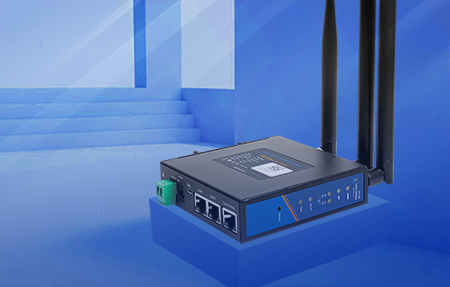
Serial to Ethernet device server, serial to Ethernet server for short.
A serial to Ethernet device server is a networked device used to connect two or more serial devices over a network. It enables you to get rid of the limitations of physical cable lengths and connect serial devices via Ethernet wherever they are located in the world. By using the serial port connection method, the device can work as if it is in close proximity to the device without any intermediate device.
The RS232/485/422 serial port device can be connected into the TCP/IP network to realize bidirectional data transmission between the RS-232/485/422 serial port and the TCP/IP network interface, and the transmission is transparent without any protocol change. According to the number of serial ports, it can be divided into single serial port, two serial ports, four serial ports, eight serial ports and sixteen serial port equipment networking servers.
The serial to Ethernet device server instantly connects traditional RS232/422/485 devices to the network. Serial device networking server is like a microcomputer with CPU, real-time operating system and TCP/IP protocol, which transmits data between serial port and network device. Use serial to Ethernet device server to access, manage, and configure remote devices from your computer over a network anywhere in the world.
Electrical equipment with only serial interfaces, such as RTU, CNC machine tools, testers, etc., can be easily connected to Ethernet to achieve network management and remote control.
In industrial environments, many legacy devices — PLCs, scales, environmental sensors, access control readers — still rely on RS232 or RS485 interfaces. These interfaces are limited to a few meters (RS232: ~15m; RS485: ~1200m). A serial to Ethernet device server solves three common problems:
No.
The role of the switch is to expand the network signal equipment, which is the Ethernet switch equipment used in industrial control. It is open, widely used, and inexpensive because of the adoption of network standards. It uses the transparent and unified TCP/IP protocol. Network has become the main communication standard in the field of industrial control.
The main purpose of serial to Ethernet device server is to allow serial devices such as printers, scanners, or climate control systems to be used in a network without relying on a computer's serial port for connectivity. This allows any serial device to be connected to the network and accessed from anywhere, including the Internet.
| Feature | Serial Device Server | Ethernet Switch | Protocol Gateway |
|---|---|---|---|
| Primary function | Serial ↔ TCP/IP bridge | Network port expansion | Protocol conversion (e.g., Modbus ↔ OPC UA) |
| Works with RS232/RS485 devices | Yes (built-in) | No (needs external converter) | Usually no |
| Transparent data transmission | Yes | Yes (at L2/L3) | No (transforms protocols) |
| Requires IP configuration | Yes (each device gets an IP) | N/A (it is the network layer) | Yes |
| Virtual COM port support | Yes (via driver software) | No | Varies |
| Protocol conversion capability | Optional (e.g., Modbus TCP/RTU) | No | Yes (core feature) |
| Typical use case | Remote serial device access | Connecting multiple network devices | Integrating different IoT protocols |
Direct connection and Ethernet connection.
The so-called direct connection mode is to directly connect the network port on the serial to Ethernet device server with the network cable port on the computer. The networking mode is simple in wiring and can realize long-distance transmission. Longer distances are possible because of the increased distance from the computer to the serial to Ethernet device server.
The numerical control equipment is connected to the Ethernet through the serial to Ethernet device server, the wire connection mode is very simple, and only the serial to Ethernet device server needs to be connected to a hub or a switch, By setting the IP address of the serial to Ethernet device server, you can make the serial to Ethernet device server a node on the Ethernet network. The RS232/485/422 serial ports of different devices can be connected to the Ethernet through the networking mode to realize heterogeneous networking.
Example 1: Direct PC-to-Device Server Connection
① Connect PC Ethernet port → RJ45 on device server (using standard CAT5e/CAT6 cable)
② Connect RS485 device A+ to device server RS485+ terminal
③ Connect RS485 device B- to device server RS485- terminal
④ Connect 12-24V DC power adapter to device server
⑤ Set device server IP to same subnet as PC (e.g., PC: 192.168.1.100, Device Server: 192.168.1.101)
① Connect Ethernet switch to router or core switch
② Connect each device server's RJ45 to the switch
③ Connect each device's RS485 bus in daisy-chain or star topology to its assigned device server
④ Assign unique IP to each device server (e.g., 192.168.1.101, 192.168.1.102, 192.168.1.103...)
⑤ Configure each device server's serial parameters independently
The serial to Ethernet device server can modify the parameters through the Web page. The serial to Ethernet device server must be in the same subnet as the computer when modifying the parameters through the Web page. Serial port parameters include: baud rate, data bit, stop bit and check bit.
The serial to Ethernet device server must have an IP, which can be configured as static or obtained through a DHCP server. Configure the working mode of the serial port networking server: including TCP SERVER mode (refers to the computer actively looking for the serial port networking server), TCP CLIENT mode (refers to the server actively looking for the computer) and UDP mode. The purpose of configuring the network parameters is to enable the computer to establish a connection with the networked server smoothly.
Because the PC software of the general user still opens the serial port to communicate with the device, at this time, because the network is used, a virtual serial port must be placed on the computer. The virtual serial port is responsible for establishing a connection with the serial to Ethernet device server and forwarding the data to the user program that opens the virtual serial port. Run the user equipment communication program and open the virtual serial port. The user application can then communicate with the device.
Based on 7+ years of deployment experience with PUSR serial device servers (USR-TCP232-304, USR-TCP232-410s, USR-N510, etc.), here is a reliable configuration workflow:
| Parameter | Common Values | Notes |
|---|---|---|
| Baud Rate | 9600, 19200, 38400, 115200 | Must match the serial device's baud rate exactly |
| Data Bits | 7 or 8 | 8 for ASCII-based protocols; 7 for Modbus RTU |
| Stop Bits | 1 or 2 | Most devices use 1 |
| Parity | None, Even, Odd | None is most common; Modbus RTU uses None |
| Flow Control | None, RTS/CTS, XON/XOFF | Match the device; most modern devices use None |
① IP Mode:Static IP (recommended for industrial stability) or DHCP (for dynamic networks)
② IP Address:Assign a unique IP within your network subnet
③ Subnet Mask:Typically 255.255.255.0
④ Gateway:Set if accessing devices outside local subnet
⑤ DNS:Required only if using domain names (e.g., for cloud MQTT)
| Mode | Who Connects First? | Best For |
|---|---|---|
| TCP Server | Client connects to server | Local LAN access; one server, multiple clients |
| TCP Client | Server connects to remote server | Remote monitoring; connecting to SCADA/master server |
| UDP | No connection (connectionless) | Real-time data streaming; loss-tolerant applications |
| HTTP Client | Server sends HTTP requests | Cloud platform integration (POST/GET data) |
① Download the virtual serial port driver from your device server manufacturer's website
② Install on the PC that runs your serial communication software
③ Launch configuration tool — it should auto-discover device servers on the network
④ Create virtual COM pair (e.g., COM1 ↔ COM2), where COM2 maps to the remote device server's IP and port
⑤ Open your legacy serial software and select the virtual COM port — it will communicate transparently with the remote device
There are four kinds.
① TCP Server mode.
② TCP Client mode.
③ UDP mode.
④ HTTPD Client mode.
The serial to Ethernet device server is widely used in access control/attendance, medical applications, remote monitoring, computer room management, and substation management. The serial to Ethernet device server can support the virtual serial port protocol, so that you do not need to change the original PC software, provide the transparent data conversion function between the serial port and the Ethernet port, and support DHCP and DNS. It is a full-duplex serial to Ethernet device server without packet loss.
RS232/485/422 three-in-one serial port, RS232, RS485, RS485/422, RS232/485 and other serial port combinations. In addition, there is serial to Ethernet device server with multiple serial ports and secondary development, which can meet all-round applications.
Beyond the traditional uses, serial device servers are increasingly deployed in these areas:
| Industry | Application | Typical Serial Devices | Benefit of Serial-to-Ethernet |
|---|---|---|---|
| Solar / Energy Storage | Inverter monitoring, battery management | Modbus RTU inverters, BMS cells | Centralized monitoring across distributed arrays; remote firmware updates |
| Smart Agriculture | Greenhouse environment control, irrigation automation | Soil moisture sensors, temperature/humidity probes, controller RTUs | Long cable runs replaced by single Ethernet; cloud dashboard integration |
| Manufacturing | CNC machine data collection, PLC monitoring | Fanuc/Siemens CNC controllers, Modbus PLCs | Real-time OEE tracking without rewiring; predictive maintenance via edge analytics |
| Building Automation | HVAC control, lighting, access management | BACnet/Modbus thermostats, card readers, fire alarm panels | Single BMS platform aggregates data from multiple floors/buildings |
| Water Treatment | Pump station monitoring, water quality testing | Flow meters, pH sensors, dosing controllers | Remote unattended operation; SMS/email alerts on parameter deviation |
| Logistics & Warehousing | Sorting system control, forklift tracking | Conveyor controllers, RFID readers, GPS modules | Real-time asset visibility; integration with WMS |
| Education & Research | Lab equipment data logging, experimental setups | Oscilloscopes, spectrometers, custom Arduino/PLC prototypes | Students/researchers access equipment remotely; automated report generation |
1. Unattended Weighing:The serial to Ethernet device server can be used to connect weighing instruments, receipt printers, gates and other weighing supporting equipment into the LAN. A LAN computer can be used to complete centralized control and data statistics management. The control center can remotely control the gate switch through the Ethernet.
2. Intelligent Agriculture:Through the serial to Ethernet device server to connect the temperature and humidity instrument, it can realize the on-site environmental monitoring management and realize the artificial intelligence management.
3. Intelligent Transportation:Serial to Ethernet device server is connected to the signal lamp, and the control center realizes the collection and processing of on-site traffic data through Ethernet. At the same time, it can also provide accurate quantitative basis for traffic command and dispatch and urban traffic planning. Traffic congestion, traffic time, traffic accidents, traffic capacity and other traffic phenomena are optimized in real time from a regional or global perspective.
Scenario:A 500kW solar farm in Shandong Province, China, with 20 string inverters distributed across four zones. Each inverter has an RS485 Modbus RTU port for real-time power output, voltage, current, and fault code data.
Architecture:
① Each zone: One PUSR USR-TCP232-410s device server aggregates 5 inverters via RS485 daisy-chain
② Device servers: Operate in TCP Server mode, each with unique IP (10.0.1.x)
③ Central: One edge gateway (USR-M300) runs Modbus TCP polling software, collecting from all 4 device servers
④ Cloud: Edge gateway pushes aggregated data via MQTT + SSL to PUSRCLOUD platform
Results:
1.For the serial to Ethernet device server, the serial port RS232/485 is usually connected to the serial device, and the other end is connected to the network port. The RS232 and RS485 serial ports work independently at the same time and do not affect each other.
2.Modbus TCP/RTU bidirectional conversion and configuration software interface.
① Subnet design:Keep all device servers and their controlling PCs in the same subnet for simple communication. Use static IP addresses — never rely on DHCP for industrial equipment.
② VLAN segmentation:Place all serial device servers in a dedicated IoT VLAN to isolate them from office IT traffic.
③ Port mapping:Assign predictable TCP port numbers (e.g., port 5000 for device server #1, 5001 for #2) for easy firewall configuration.
① RS485 bus length:Maximum 1200m at 9600 baud; reduce max distance as baud rate increases. Use shielded twisted-pair cable (CAT5e is sufficient).
② Termination resistor:Install 120Ω termination resistor at both ends of RS485 bus for noise immunity in electrically noisy environments (near VFDs, motors).
③ Grounding:Connect shield to ground at one end only (typically the master side) to prevent ground loops.
④ RS232:Never exceed the rated cable length (15m). For longer distances, use RS485 conversion or a fiber optic converter instead.
① Change default passwords:Every device server ships with default admin credentials. Change them immediately.
② Enable SSL/TLS:PUSR models (410s, N540, N580) support SSL/TLS encryption for TCP, HTTP, and MQTT connections. Always enable for Internet-facing deployments.
③ Firewall rules:If device servers are accessible from the Internet, restrict allowed source IPs to known management stations only.
④ Firmware updates:Regularly check manufacturer releases for security patches.
① Watchdog verification:Test hardware watchdog by unplugging/replugging power — device should auto-recover within 30 seconds.
② Redundant power:For critical applications, use UPS or redundant DC power supplies.
③ EMC compliance:Select devices rated for industrial EMC (EN 61000-4-2/4/5) in environments with electrical noise.
④ Temperature range:Verify operating temperature meets site conditions (-40℃ to +85℃ for PUSR industrial-grade models).
| Problem | Check | Solution |
|---|---|---|
| Cannot ping device server IP | PC and device server on same subnet? | Set PC IP manually; check Ethernet cable; verify link lights |
| Virtual COM port shows no data | Serial parameters match on both sides? | Verify baud rate, data bits, parity, stop bits. Check RS485 A/B wiring polarity |
| Intermittent communication drops | Network interference or cable length? | Check cable quality; add termination resistor; switch to wired Ethernet (not WiFi) if applicable |
| Data corruption (garbage characters) | Baud rate mismatch or grounding issue? | Verify exact baud rate of serial device; check ground connection; replace shielded cable |
| Device server rebooting repeatedly | Power supply within specification? | Measure DC voltage under load; ensure power supply meets current rating (typically 0.5-1A) |
The table below covers PUSR's serial to Ethernet converters, from entry-level to edge computing models. All support Modbus TCP/RTU gateway and virtual COM port drivers.
| Model | Serial Ports | Network | Special Features | Typical Use |
|---|---|---|---|---|
| USR-TCP232-302 | 1× RS232 | 1× 10/100M Ethernet | Modbus Gateway, Virtual COM | Basic single-device remote access |
| USR-TCP232-304 | 1× RS485 | 1× 10/100M Ethernet | Modbus Gateway, Virtual COM | RS485 sensor networks, Modbus polling |
| USR-TCP232-306 | 1× RS232/485/422 | 1× 10/100M Ethernet | Three-in-one, Modbus Gateway | Flexible legacy interface support |
| USR-DR301 | 1× RS232 | 1× 10/100M Ethernet | DIN Rail mount | Panel/cabinet installation |
| USR-DR302 | 1× RS485 | 1× 10/100M Ethernet | DIN Rail mount | Industrial cabinet, rail-mount setups |
| USR-DR132/134 | 1× RS485/232 | 1× 10/100M Ethernet | Lipstick size, MQTT, SSL/TLS | Space-constrained installations |
| USR-N510 | 1× RS485 | 1× 10/100M Ethernet | MQTT, SSL/TLS, Virtual COM | Single RS485 bus to cloud |
| USR-N520 | 2× RS485 | 1× 10/100M Ethernet | MQTT, SSL/TLS, Dual bus | Two separate RS485 networks |
| USR-N540 | 4× RS485 | 1× 10/100M Ethernet | MQTT, SSL/TLS, 4-port | Multi-device aggregation |
| USR-N580 | 8× RS485 | 1× 10/100M Ethernet | MQTT, SSL/TLS, 8-port | Large sensor network consolidation |
| USR-TCP232-410s★ | 1× RS232 + 1× RS485 | 1× 10/100M Ethernet | Edge Computing (up to 300 data points), MQTT+SSL, Modbus Gateway, Cortex-M7 400MHz | Recommended all-rounder; edge analytics + cloud |
| USR-N780 | 8× RS485 | 1× 10/100M Ethernet | Edge Gateway, Protocol Conversion, SD Card | Industrial edge computing hub |
| USR-N716 | 16× RS485 | 1× 10/100M Ethernet | Edge Gateway, Protocol Conversion | Large-scale data aggregation plant |
| USR-W660 | 1× RS232/485 | WiFi 6 + Ethernet | WiFi 6 Roaming, MQTT+SSL | Wireless deployments, mobile equipment |
A:Yes. Install the virtual COM port driver provided by the manufacturer. The driver creates a local virtual COM pair (e.g., COM1 ↔ COM2) on your PC. Point your software to the local virtual COM port — the driver transparently forwards all data to the remote device server over the network. Your software does not need any modification.
A:It depends on the model. Single-port models (e.g., USR-TCP232-304) connect one RS485 bus, which can daisy-chain up to 128 Modbus slave devices. Multi-port models (e.g., USR-N540 with 4 ports, USR-N780 with 8 ports) can connect multiple RS485 buses, each with up to 128 devices. So a USR-N780 could theoretically manage 8 × 128 = 1024 serial devices.
A:Yes, models like USR-TCP232-410s, USR-TCP232-304, and USR-TCP232-306 include built-in Modbus gateway functionality. They can convert Modbus RTU (serial) to Modbus TCP (Ethernet) and vice versa. The 410s model supports multi-host Modbus polling, where multiple master stations can simultaneously poll serial slave devices through the device server.
A:Yes. Serial device servers have standard Ethernet interfaces and can be connected to any network — LAN, WAN, or the Internet. For Internet deployments, configure proper firewall rules, use static IP or DDNS, and enable SSL/TLS encryption (supported on 410s, N540, N580, DR132/134, W660 models) to protect data in transit.
| Standard | Distance | Speed | Topology | When to Use |
|---|---|---|---|---|
| RS232 | Up to 15m | Up to 115.2 Kbps | Point-to-point only | Short distance; PC-to-device; single device |
| RS485 | Up to 1200m | Up to 10 Mbps (shorter distance at max speed) | Multi-drop (daisy-chain, up to 128 nodes) | Industrial sensor networks; Modbus RTU; long cable runs |
| RS422 | Up to 1200m | Up to 10 Mbps | Point-to-multipoint (1 transmitter, up to 10 receivers) | Full-duplex serial communication over distance; less common than RS485 |
A:Follow these security measures:
A:Yes. PUSR offers WiFi serial device servers including the USR-W610 (WiFi + Ethernet), USR-W630 (WiFi + 2× Ethernet), USR-W660 (WiFi 6 + Ethernet), USR-DR164/162 (dual-band WiFi), and USR-S100 (WiFi-only, solar-data-stick form factor). WiFi models are ideal for mobile equipment (forklifts, AGVs) or locations where running Ethernet cable is impractical.
A:Edge computing capability on a serial device server means the device itself can collect, process, and transform data before sending it to the cloud. For example, the USR-TCP232-410s supports up to 300 data points with custom JSON conversion, allowing you to:
Do you need it?If you have fewer than 20 sensors and simple data logging, a basic model (302/304/306) is sufficient. If you need local data processing, multi-protocol conversion, or want to reduce cloud server load, edge computing models (410s, N780, N716) provide better ROI.
A:Key differentiators for PUSR:
A:Standard models (302, 304, 306, N510, N520) are generally in stock and ship within 1-3 business days. Custom configurations (firmware customization, special connectors, ODM) require 2-4 weeks depending on complexity. PUSR's self-owned manufacturing facilities enable faster production runs compared to brands that outsource to third-party contract manufacturers.
PUSR (PUSR Cloud Technology Co., Ltd.)is a global IoT communication provider specializing in industrial gateways, serial device servers, cellular routers, and edge computing platforms.